How to Open a CSV File in Windows 11 [4 Ways]
Readers help support Windows Report. We may get a commission if you buy through our links.
Read our disclosure page to find out how can you help Windows Report sustain the editorial team. Read more
On Windows 11, opening a CSV file may seem straightforward—but many users run into issues such as broken formatting, jumbled text, or the file opening in the wrong application like Notepad instead of Excel.
If you’re wondering how to open a CSV file properly on your Windows 11 PC, this guide walks you through all the reliable options: from Excel and Notepad to Google Sheets and free alternatives like LibreOffice. Whether you’re a casual user reviewing data or someone managing large reports, we’ll help you pick the right method, avoid encoding issues, and ensure your CSV files are readable and well-formatted.
Let’s look at the easiest and most effective ways to open a CSV file on Windows 11.
- Open CSV in Microsoft Excel
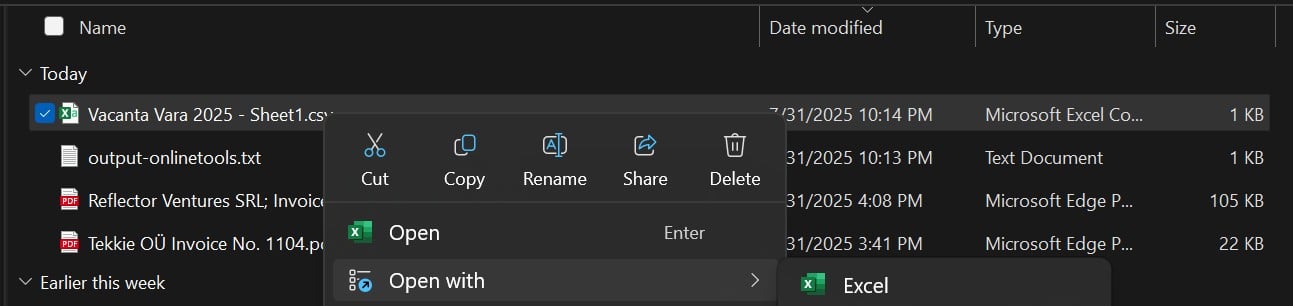
1. Right-click the CSV file → click Open with → choose Excel
2. If not listed, click Choose another app → find Excel manually
3. Excel will auto-detect separators like commas or semicolons
- Open CSV in Notepad or Notepad++
1. Right-click the file → choose Open with → select Notepad
2. For better formatting, install Notepad++ via https://notepad-plus-plus.org
3. Set UTF-8 encoding if text appears broken
- Open CSV in Google Sheets
1. Go to sheets.google.com
2. Click File → Import → Upload, then select your CSV
3. Customize delimiter (comma, tab, semicolon) in import settings - Open CSV with LibreOffice Calc (Free)
1. Download LibreOffice from libreoffice.org
2. Open Calc → File → Open → select your CSV
3. Choose delimiter and encoding in the import wizard
Fix CSV Not Opening Properly
- Right-click the CSV → Properties → “Opens with” → set default to Excel
- Change file extension to
.txtand reopen in Excel via File → Open - Use Data → From Text/CSV in Excel to manually import and preview
Why It Works
CSV (Comma-Separated Values) is a plain-text format readable by many programs. Excel parses structured data best, but editors like Notepad work for basic review. Online tools offer cross-platform access without installation.
FAQs
What program opens CSV files by default on Windows 11?
By default, Windows may open CSVs with Notepad. You can change this to Excel in File Properties.
Why does my CSV show in one line or with weird characters?
This happens due to incorrect encoding or delimiters. Use Excel’s import feature and select the proper separator.
Can I open CSVs without Excel?
Yes, using Notepad, Google Sheets, LibreOffice Calc, or even a browser extension.
Related Articles