Narrator Gets On-screen Braille Viewer in Windows 11 With Latest Dev & Beta Update
Readers help support Windows Report. We may get a commission if you buy through our links.

Read our disclosure page to find out how can you help Windows Report sustain the editorial team. Read more
Today, Microsoft released two new updates, KB5064093 and KB5064089, rolling out in the Dev and Beta channel for Windows 11 Insiders. The good news is that the both updates add an important accessibility upgrade to Narrator.
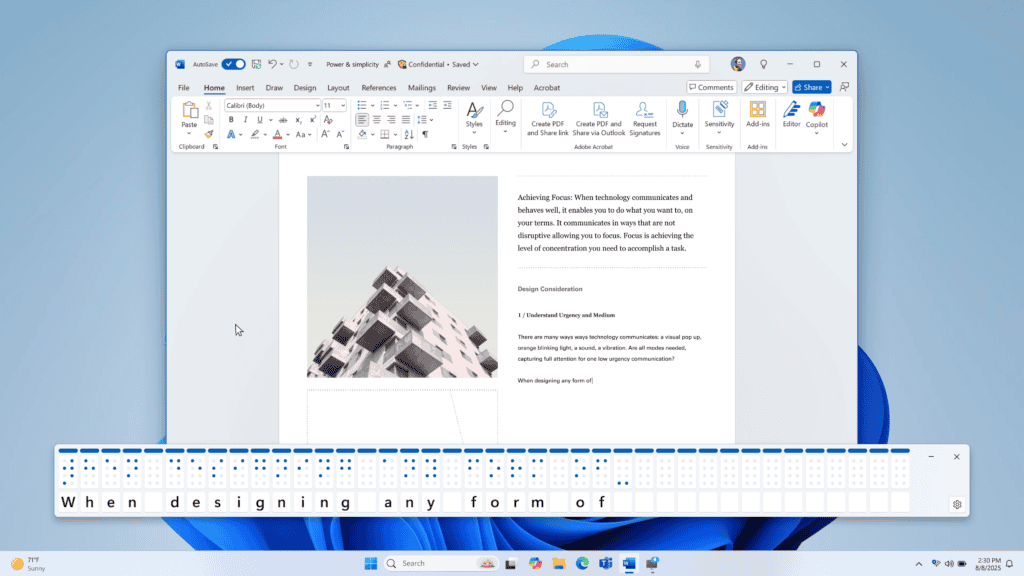
The new Braille viewer allows users to see on-screen text alongside Braille output, making it easier for educators, trainers, and developers to follow along without specialized hardware.
When enabled, the feature opens a floating window that displays Braille cells updated in real time. By default, 40 cells are shown if no device is connected, expanding to 80 with compatible hardware. Users can adjust the viewer’s size and position through settings.
To activate, Insiders need to launch Narrator with Win + Ctrl + Enter, then press Narrator key + Alt + B. For the feature to work, Braille output must be enabled and the Braille package installed through Accessibility settings.
Microsoft says this tool will help Teachers of Students with Visual Impairments support classroom learning by visually tracking Braille. It also benefits accessibility testers and developers who lack access to refreshable Braille devices.
The latest updates also adds Microsoft 365 Profile Cards and Excel table conversion to Click to Do. Moreover, Microsoft has also released Windows 11 25H2 to the Release Preview channel earlier today.