Latest Windows 11 Update, KB5072043, Adds Agent Launchers for System-Wide AI Agents
Microsoft is rolling out a new framework called Agent Launchers in Windows 11 Insider Preview Build 26220.7523 (KB5072043), which it says will give apps a standardized way to register AI agents and make them visible across Windows.
Agent Launchers allow developers expose interactive AI agents at the system level, instead of keeping them locked inside individual apps. Once registered, these agents can be surfaced and launched by Windows itself or by other supported applications. When opened, the agent launches directly into its chat interface, allowing users to begin working immediately.
Unlike passive tools, these agents are designed to be active and task-driven. They can ask follow-up questions, retain context, and take actions to complete work. Microsoft describes them as collaborative experiences rather than simple command responders.
A key part of the framework is single registration. Developers register an agent once, and it becomes available anywhere Agent Launchers are supported. That includes Ask Copilot on the taskbar with Microsoft 365 Copilot, as well as other Windows apps that adopt the framework.
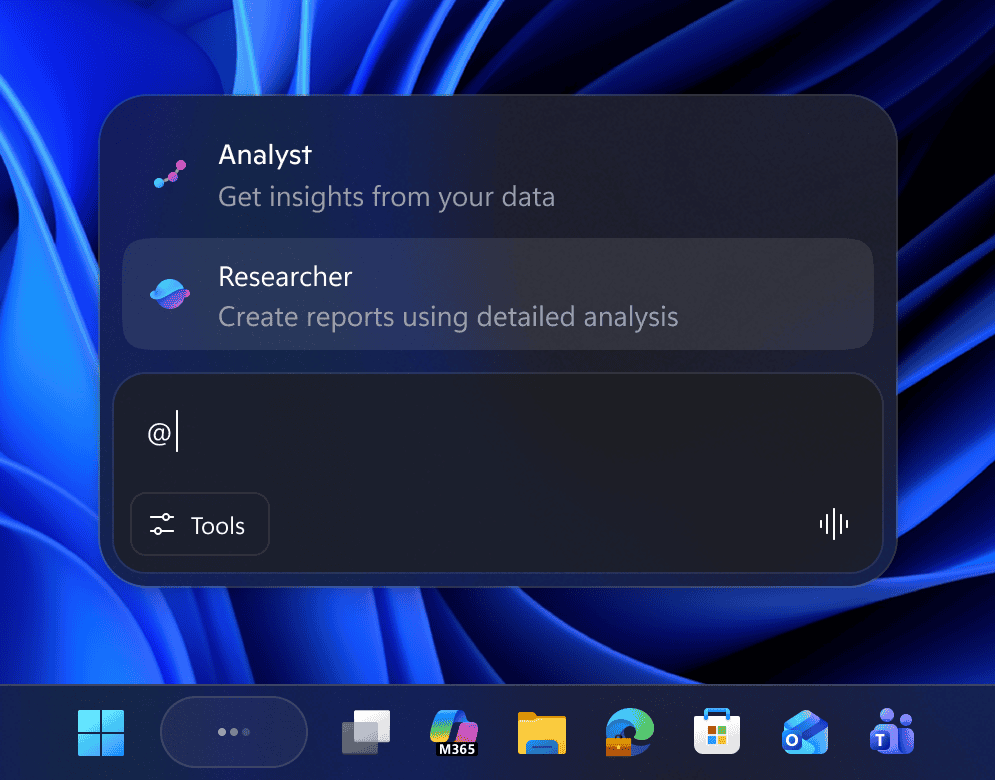
Microsoft 365 Copilot already uses Agent Launchers internally. Agents like Analyst, which focuses on extracting insights from data, and Researcher, which builds detailed reports, are registered through this system. This same mechanism is now opening up to third-party developers.
Agents can be registered in two ways. Static registration happens during app installation, while dynamic registration allows agents to appear or disappear based on conditions such as sign-in status, subscriptions, or licensing. That gives developers control over when agents are available without requiring system-level changes.
From a platform perspective, Agent Launchers moves Windows closer to acting as a shared surface for AI agents rather than just an app launcher. For users, it means AI tools can be discovered and accessed consistently, regardless of which app originally installed them.


Readers help support Windows Report. We may get a commission if you buy through our links.

Read our disclosure page to find out how can you help Windows Report sustain the editorial team. Read more