Google Lens Support for Image Searches Coming to Firefox
Readers help support Windows Report. We may get a commission if you buy through our links.

Read our disclosure page to find out how can you help Windows Report sustain the editorial team. Read more
Mozilla has been adding new features to Firefox lately, including smart tab grouping, AI link previews, and Web GPU Support on Windows. Now, the company is working on bringing long-awaited image search support to Firefox through integration with Google Lens.
Microsoft Edge already offers Visual Search for images, using Bing to find related content. Google Chrome integrates Google Lens directly, helping users identify objects, shop for similar items, and translate text in images.

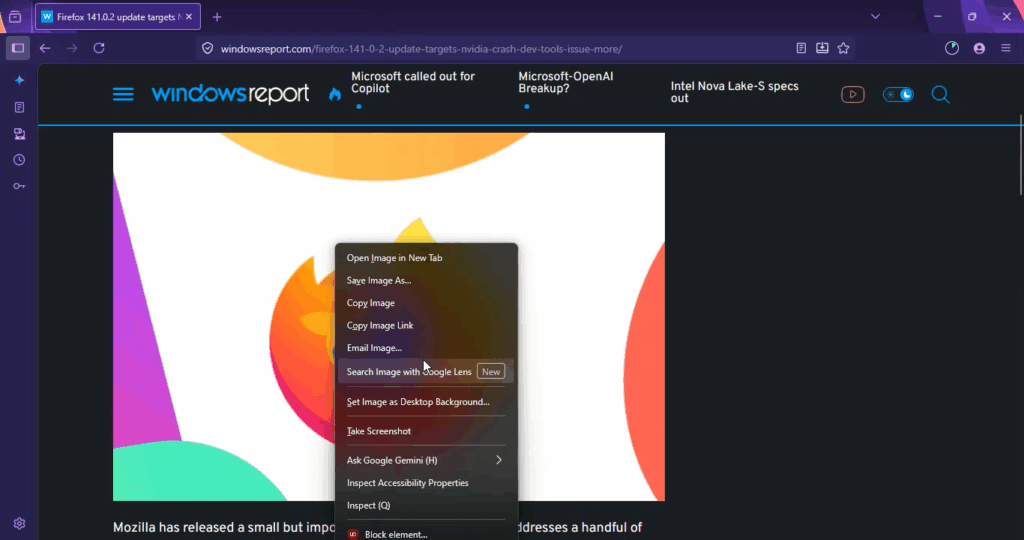
The upcoming native option will let users right-click an image, choose “Search Image with Google Lens,” and see results on the Google Lens site. This works not only for images embedded on a webpage but also for standalone images opened directly in a new tab via their URL. In both cases, Firefox will open a new tab with the Google Lens interface, showing sections such as Visual matches, Products, and About this image.

The Google Lens Image Search option appears alongside existing items like Open Image in New Tab, Copy Image, and Take Screenshot.

The feature is expected to work for most online images, though Google may still filter searches for sensitive or restricted content.
Interestingly, the option also appears when browsing in Private Mode, meaning users will be able to perform visual searches without leaving a record in Firefox’s history.
There is no set release milestone yet, but this change removes a long-standing gap with rival browsers and makes visual search far easier for Firefox users.
That’s not all: Mozilla is working on Firefox to survive Windows 11 upgrades via a smart desktop launcher. Additionally, the company is testing Firefox IP Protection for the VPN product and has received a dedicated Firefox.com download hub.