Microsoft Brings Teams VDI Optimization to Amazon WorkSpaces
Readers help support Windows Report. We may get a commission if you buy through our links.

Read our disclosure page to find out how can you help Windows Report sustain the editorial team. Read more
Microsoft today announced the first-ever Virtual Desktop Infrastructure (VDI) optimization for Microsoft Teams in Amazon WorkSpaces, now available in Public Preview. This update marks a breakthrough for AWS customers, offering a fully optimized Teams experience on Windows endpoints for both Personal and Pools WorkSpaces configurations.
Until now, Amazon WorkSpaces users had to rely on unoptimized Teams clients that struggled with performance and stability. With this release, Microsoft is addressing a long-standing demand from enterprises using AWS-based virtual desktops.
What’s new in Teams for Amazon WorkSpaces
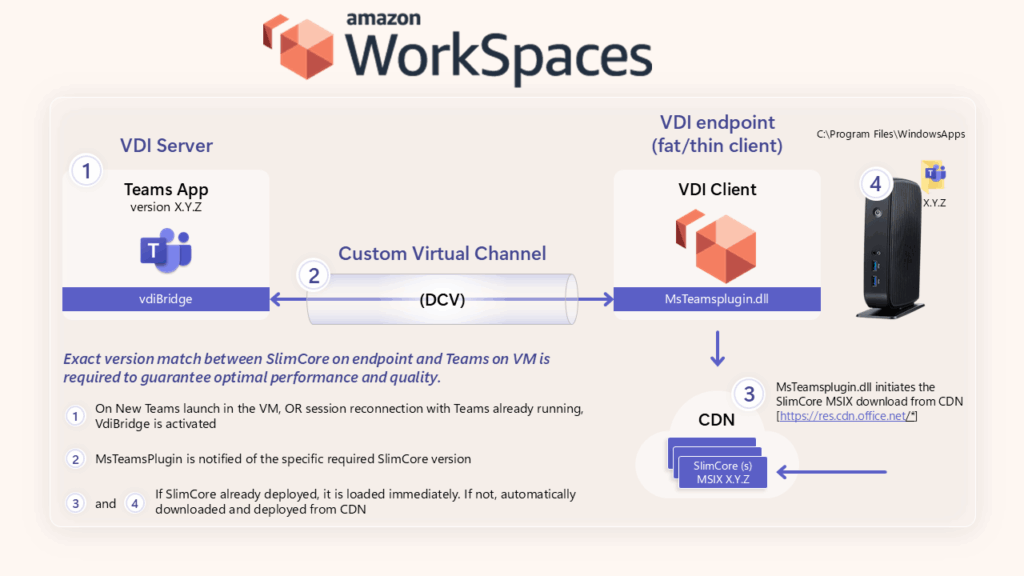
The new solution introduces multimedia offloading and optimization powered by the SlimCore Media engine, bringing features that improve everyday collaboration. These include:
- High-definition audio and video for clearer calls and meetings
- Smooth screen sharing with reduced lag
- Lower latency and improved reliability by offloading media processing to the local device

Microsoft confirmed that this release is exclusive to Amazon WorkSpaces when connecting via the Windows WorkSpaces Client. AppStream and other platforms are not supported at this time.
For many enterprises, especially those relying on VDI for contractors or cross-tenant collaboration, the lack of Teams optimization on AWS has been a challenge. This update promises:
- Improved call quality and responsiveness in meetings
- Feature parity with the desktop Teams client
- More reliable performance for external and hybrid collaboration
Global companies like Wolters Kluwer have already tested the new setup, reporting significant improvements in audio-video quality and stability across regions.
Agencies and enterprises can now configure Teams with SlimCore-based VDI optimization in Amazon WorkSpaces. Setup requires enabling the feature through Teams update policies in the Teams Admin Center. The feature is currently in Public Preview, with General Availability (GA) to follow later, as listed on Microsoft’s public roadmap entry.