Microsoft Edge Experiments With Passkey Roaming and Sync Controls
Readers help support Windows Report. We may get a commission if you buy through our links.

Read our disclosure page to find out how can you help Windows Report sustain the editorial team. Read more
After Android, Microsoft is testing new passkey-related features in the Canary version of Edge on desktop, introducing options for passkey roaming and clearer management settings.
What Are Passkeys?
Passkeys are a password replacement built on WebAuthn and FIDO2 standards. They allow you to sign in securely using cryptographic keys stored on your device, protected by biometrics such as Windows Hello or a phone’s fingerprint sensor. Unlike passwords, passkeys cannot be phished or reused, offering stronger protection for online accounts.
What Is Passkey Roaming?
Roaming means passkeys aren’t limited to a single device. Instead, they can sync securely through your account, allowing you to sign in from multiple trusted devices without needing to recreate or manually transfer them.
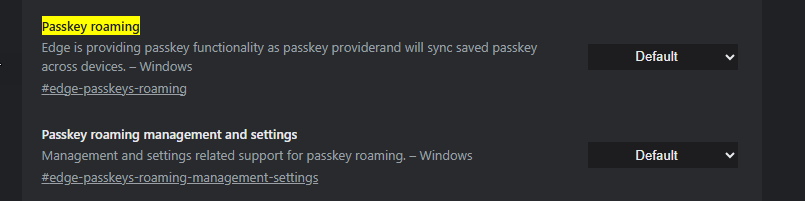
Edge is testing new experimental features for passkey roaming, revealed through two flags in Canary: “Passkey roaming” and “Passkey roaming management and settings.”
Passkey roaming: Positions Edge as a passkey provider, enabling it to sync saved passkeys across devices. The description reads: “Edge is providing passkey functionality as a passkey provider and will sync saved passkeys across devices. – Windows”
Passkey roaming management and settings: Introduces options to give users more control over how synced passkeys are handled. Its description states: “Management and settings related support for passkey roaming. – Windows”

Enabling these flags adds a new entry under Profiles > Sync in Edge settings, labeled “Passwords and passkeys“, with the description:
“Stored securely and made available on all your devices. Review security settings to help make your Microsoft account even more secure.”

This is the first time Edge has explicitly listed passkeys alongside passwords in sync options, showing Microsoft’s intention to integrate them directly into the browser.
Until now, Edge’s passkey support has relied mostly on Windows Hello and platform-level integrations. The addition of roaming and management settings suggests Microsoft is preparing to make Edge a first-class passkey provider, with sync and security controls available directly in the browser.
That’s not all. Microsoft is adding Smart GPT-5 to Edge Copilot and has moved the address bar above the tabs. The company is also testing Copilot in InPrivate browsing.