Microsoft Edge for iOS Now Supports Background YouTube Playback Without Premium
Readers help support Windows Report. We may get a commission if you buy through our links.

Read our disclosure page to find out how can you help Windows Report sustain the editorial team. Read more
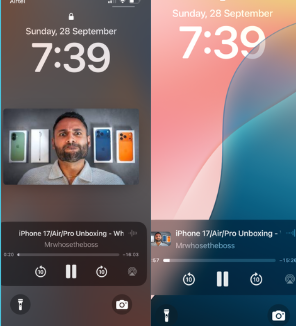
If you’ve ever wanted to keep listening to YouTube or your favorite podcasts on your iPhone even after locking your screen, Microsoft Edge has just made it possible on iOS. You don’t need to pay for YouTube Premium.
While Microsoft is still testing background video playback in Edge Canary on Android, where it’s hidden behind a flag, on iOS, the feature works right out of the box in the beta.
You can play a YouTube video, lock your phone, or switch to another app, and your audio will keep going. This is perfect for students streaming lectures, music lovers, or anyone who multitasks with long-form videos and podcasts.

This is a big deal because Chrome on Android doesn’t allow background video play for most sites, especially YouTube. Normally, only YouTube Premium members get this perk. On Edge for iOS, it’s free and easy. However, Chrome for Android does support background listening for webpages with the Read Aloud feature.
Microsoft has also added a one-tap privacy shortcut, making it simple to clear history and cookies directly from the menu in seconds.
All these new features are available now in Microsoft Edge Beta for iOS via TestFlight. They are expected to arrive in the stable release soon. Edge wants to make mobile browsing easier, quicker, and much more convenient, with no subscriptions required.
That’s not all. Microsoft will soon block malicious sideloaded extensions in Edge starting in November this year. The company is also testing Visual Search in the Edge desktop search bar.