Best GPU for Ryzen 7 9850X3D 2026 – our top picks for the AMD X3D CPU
Having come out at the end of January 2026, the release of the 9850X3D brought about a new best gaming CPU. Boosting what the 9800X3D is capable of by giving it an extra 400MHz boost speed, it should be capable of bringing just a bit of extra performance to the build.
The reviews might show it to be a mixed bag, considering it’s not a big improvement while also costing more. Yet it’s still not quite at the level of the next X3D CPU, the 9900X3D. So if you’re still after a value CPU with 8 cores and 16 threads, the 9850X3D can be a consideration.
Alongside the top CPU, though, you’re probably going to want to consider finding the best GPU for the 9850X3D as well to get a well-built and great-performing gaming PC. So we’ve picked out some of our top picks of graphics cards to pair up with the CPU. Here they are.
Products at a glance
-
 Best overall GPU for the 9850X3D
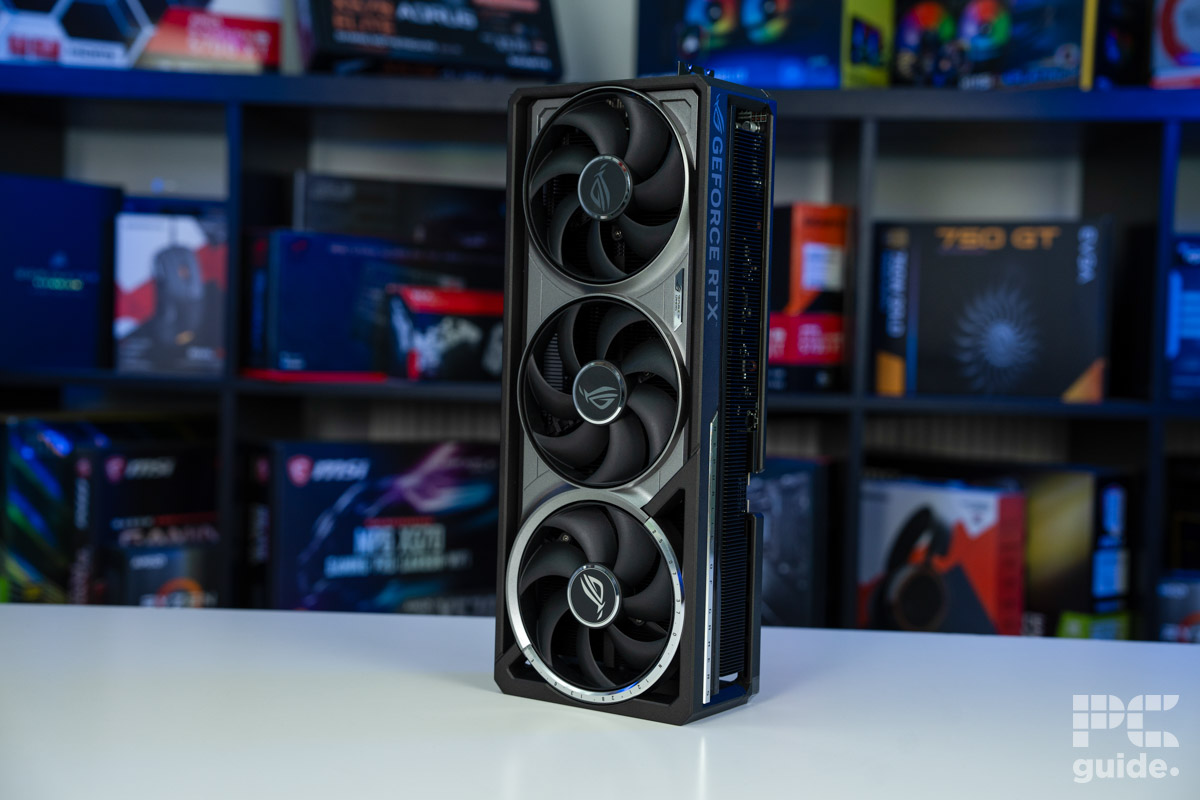
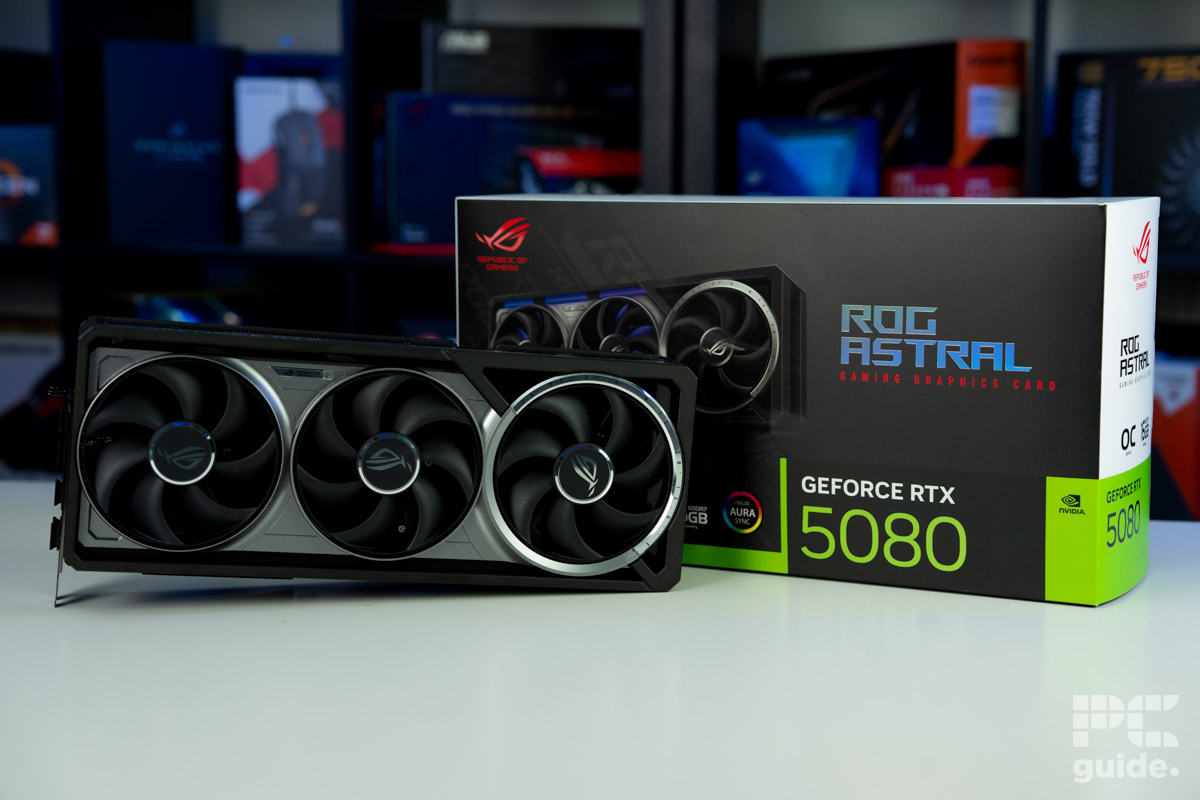
ROG Astral GeForce RTX 5080 OC
- GPU: GB203
- CUDA Cores: 10,752
- VRAM: 16GB GDDR7
- Memory Bus Width: 256 bit
- Base Clock Speed: 2,295 MHz
- Boost Clock Speed: 2,790 MHz

-
 Best Nvidia GPU for the 9850X3D
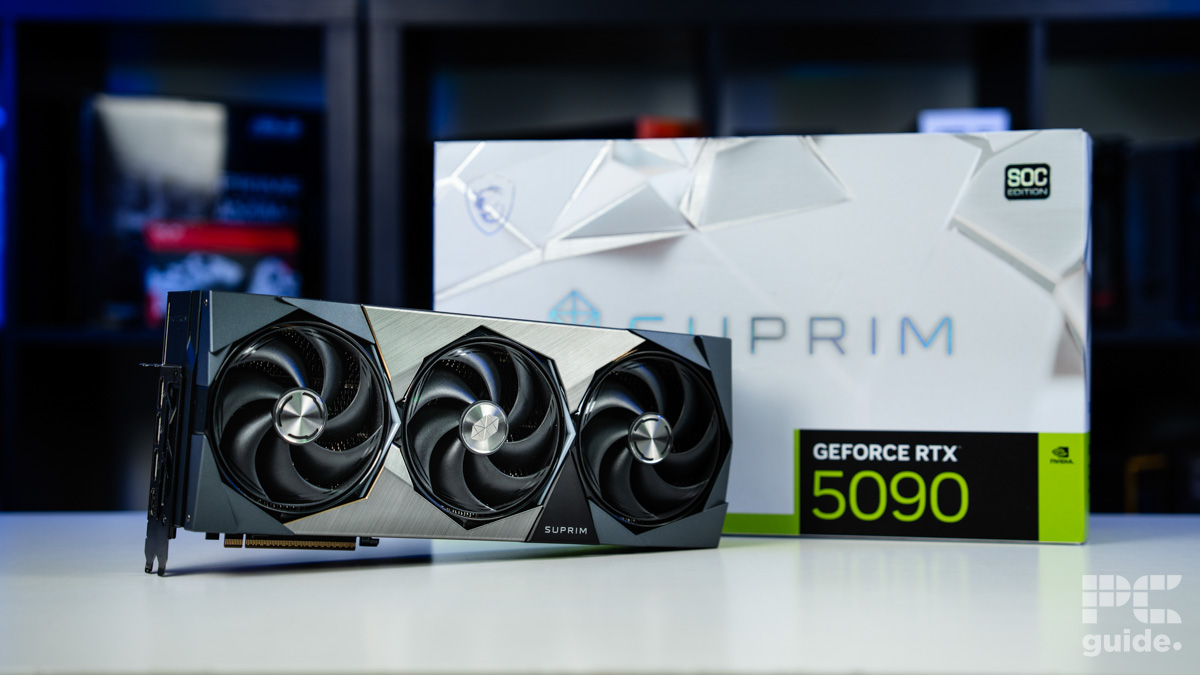
MSI GeForce RTX 5090 SUPRIM SOC
- GPU: GB202
- CUDA cores: 21,760
- VRAM: 32GB GDDR7
- Memory Bus width: 512-bit
- Base clock speed: 2,010MHz
- Boost clock speed: 2,565MHz

-
 Best AMD GPU for the 9850X3D
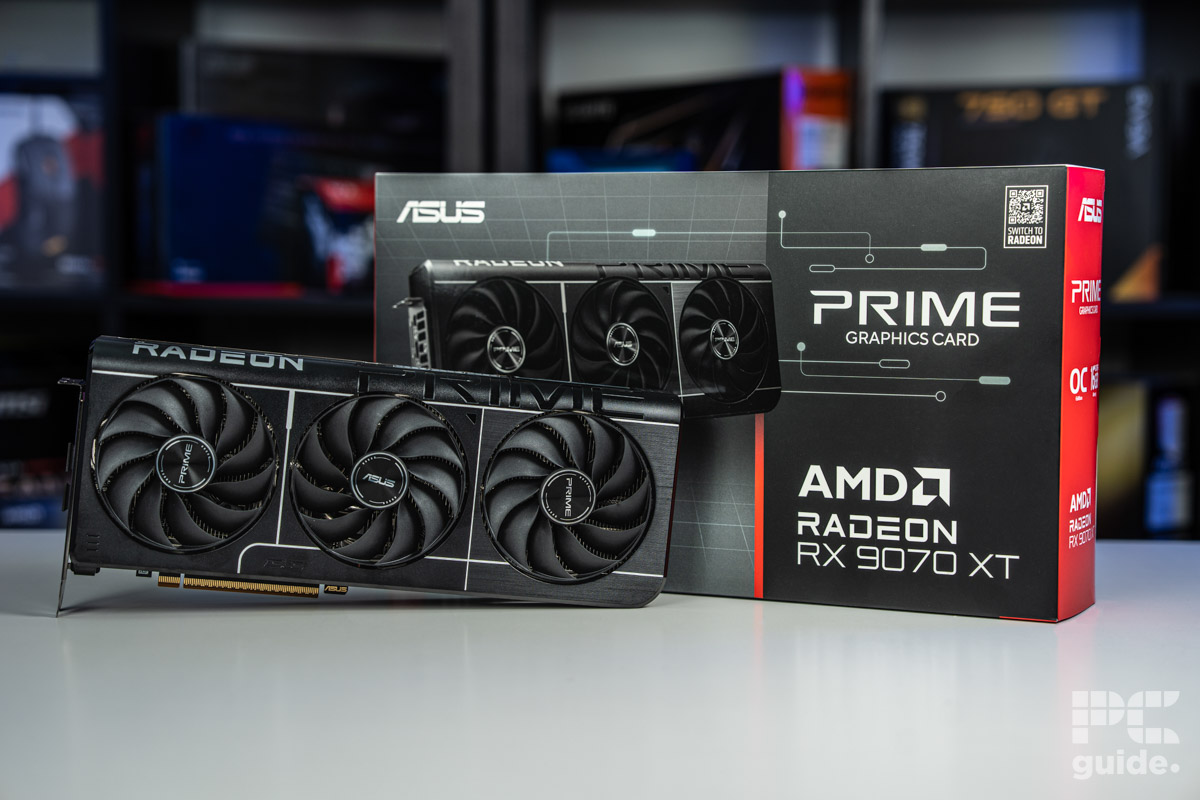
ASUS Prime RX 9070 XT OC
- GPU: Navi 48 XT
- Stream Processors: 4,096
- VRAM: 16GB GDDR6
- Memory Bus Width: 256-bit
- Base/Game/Boost clock speed: 1,660/2,400/2,970 MHz
- TBP: 304W
-
 Best budget GPU for the 9850X3D
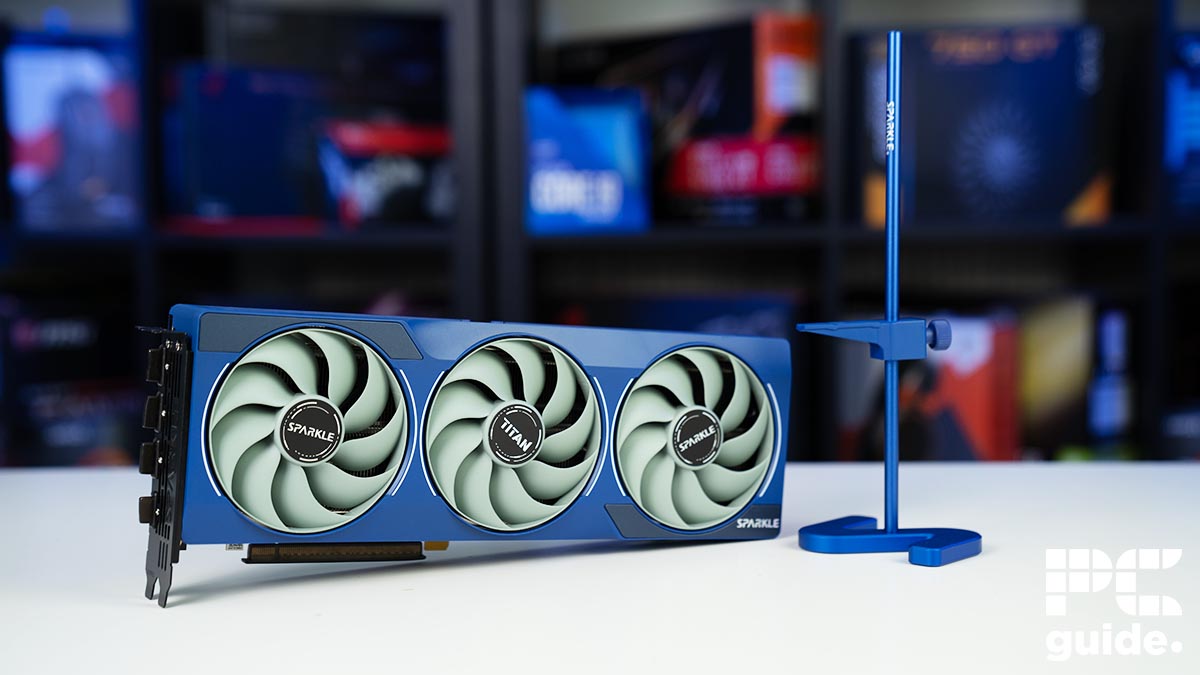
SPARKLE Intel Arc B580 TITAN OC
- GPU: BGM-G21
- Shading units: 2,560
- VRAM: 12GB GDDR6
- Memory bus width: 192-bit
- Bandwidth: 456GB/s
- Base/Boost clock speed: 2,670/2,740 MHz
How we picked the best GPU for the 9850X3D
When deciding on which graphics cards to recommend to pair up with the 9850X3D, we use our years of expertise in the field to understand the requirements and what goes well with the processor. But we don’t rely on just that, as we also look to our GPU reviews, with plenty of hands-on testing, we know the performance these cards are capable of.
So with the testing lab and our GPU tests, we accumulate all of that to create this list of best GPUs for the 9850X3D. With a variety of options, we have plenty of GPU reviews to take from and provide an extensive list of models to choose.
Our best graphics cards
Best overall GPU for the 9850X3D
01
Specifications
- GPU: GB203
- CUDA Cores: 10,752
- VRAM: 16GB GDDR7
- Memory Bus Width: 256 bit
- Base Clock Speed: 2,295 MHz
- Boost Clock Speed: 2,790 MHz
The first of the picks is the RTX 5080, as the more high-end choice from Nvidia’s Blackwell range, but without the price tag of the flagship 90 series. Although with the memory shortage, pretty much everything is getting more expensive anyway, so it might not be as cheap as it should.
With the various GPU models, we have tested two different 5080s, the Founders’ Edition from Nvidia and the ROG Astral. The FE model is the basis of all the 5080’s, while the ROG Astral expands on size but also performance with its bigger design and boost clock over factory.
In our testing of the ROG Astral, we did in fact use it with the 9800X3D, so the results aren’t far off what you can expect to get with the 9850X3D. From our benchmarks, we did find it to be a fairly capable 4K gaming GPU, such as in CS2, the graphics cards it does average 196fps, with 1440p achieving 362, and 1080p averages 487.
In something more graphically intensive, Cyberpunk 2077, the Astral 5080 averages 75fps at 4k, 159fps at 1440p, and 220fps at 1080p. Chucking on ray tracing and highest settings, that becomes 36, 72, and 109 fps respectively, which isn’t too playable, but also you would probably run it lower or utilize upscaling.
Away from gaming performance, the RTX 5080 achieves a score of 21,982 in 3DMark Fire Strike Ultra, 16,498 in Time Spy Extreme, 22,594 in Port Royal, and 8,391 in Steen Nomad. While in Blender, it achieved scores of 4,580.27 in monster, 2,358.48 in junkshop, and 2,295.56 in classroom.
Overall, the RTX 5080 is a well-rounded graphics card, both in gaming and other workloads. Although capable of 4K, you probably get the most out of 1440p capability with a high refresh rate. But either way, it can easily push and match what the 9850X3D is capable of.
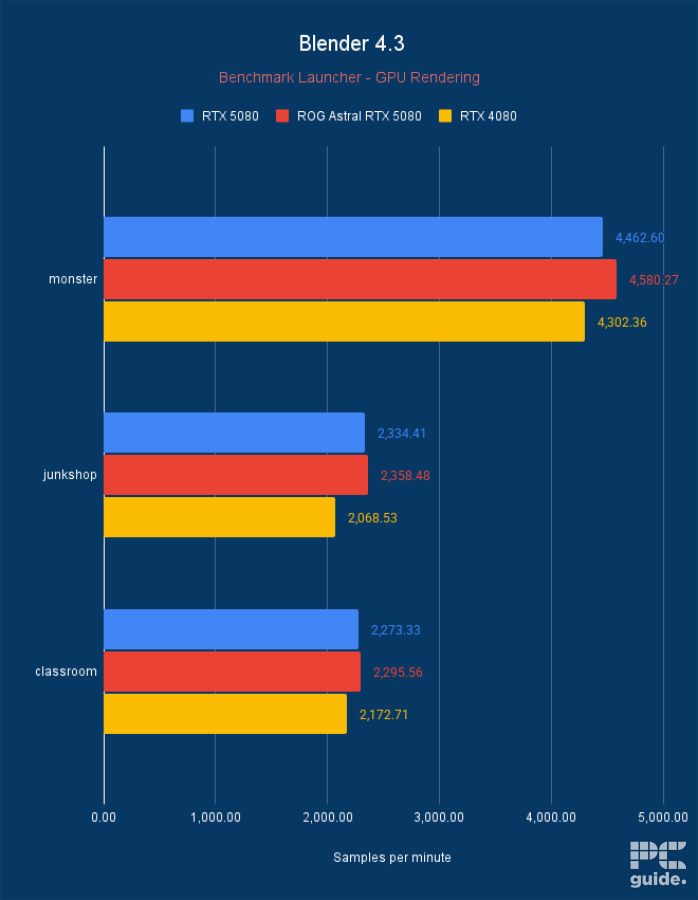
ROG Astral RTX 5080 OC Blender 4.3, Image by PC Guide
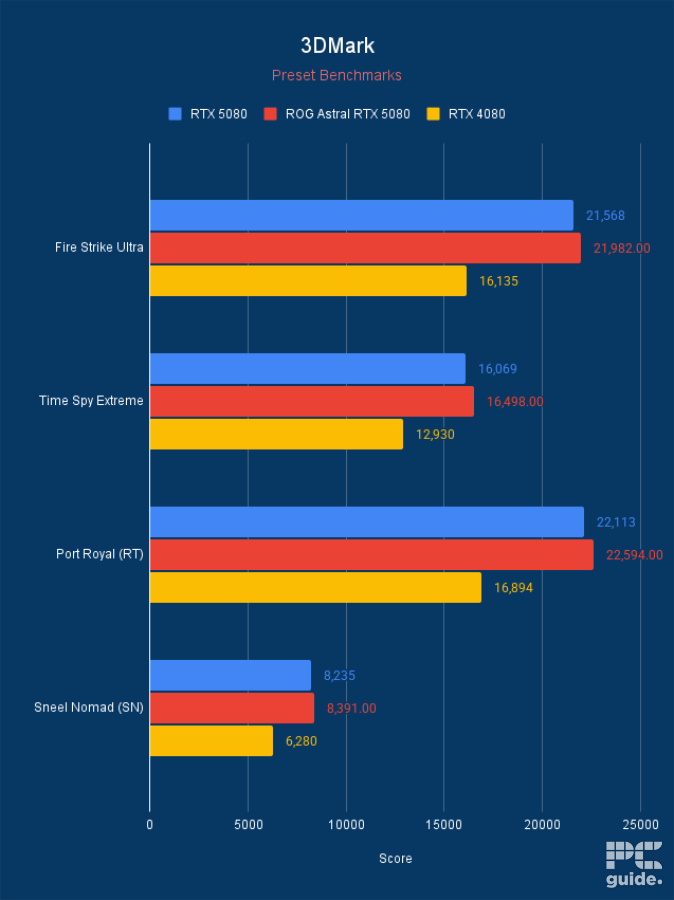
ROG Astral RTX 5080 OC 3DMark, Image by PC Guide
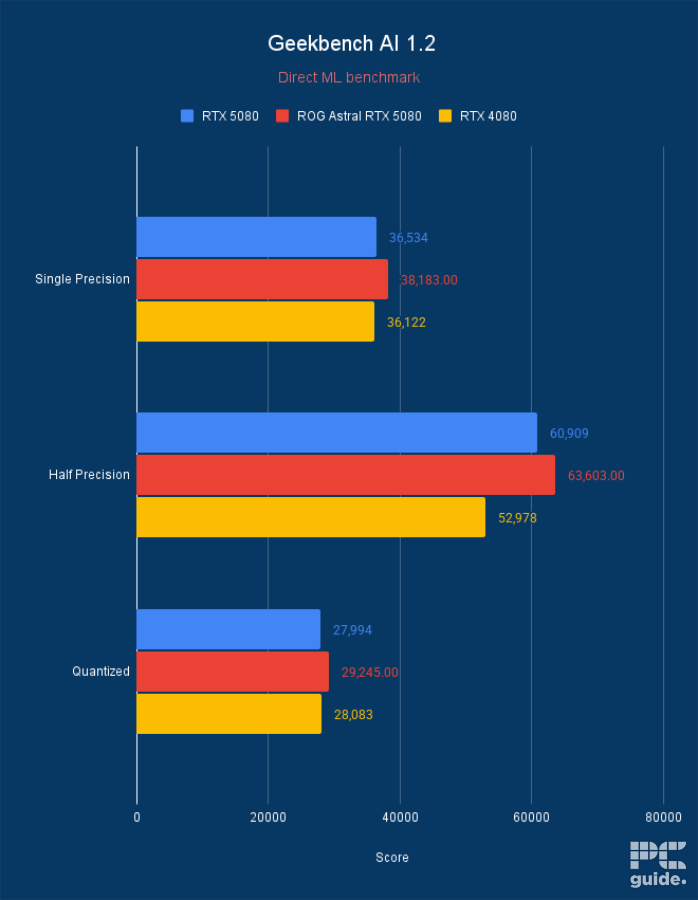
ROG Astral RTX 5080 OC Geekbench AI 1.2, Image by PC Guide
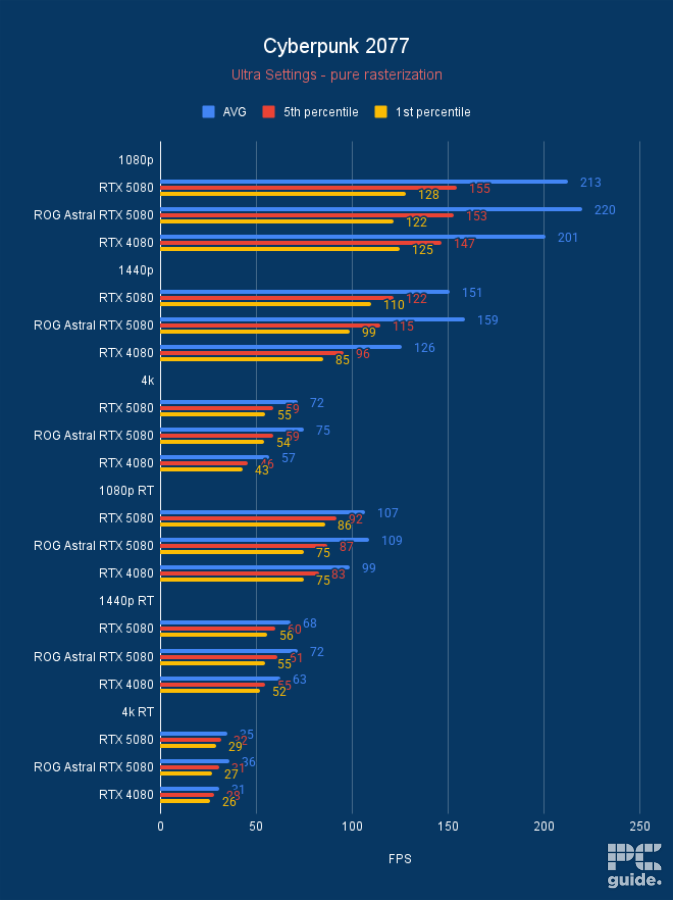
ROG Astral RTX 5080 OC Cyberpunk 2077, Image by PC Guide
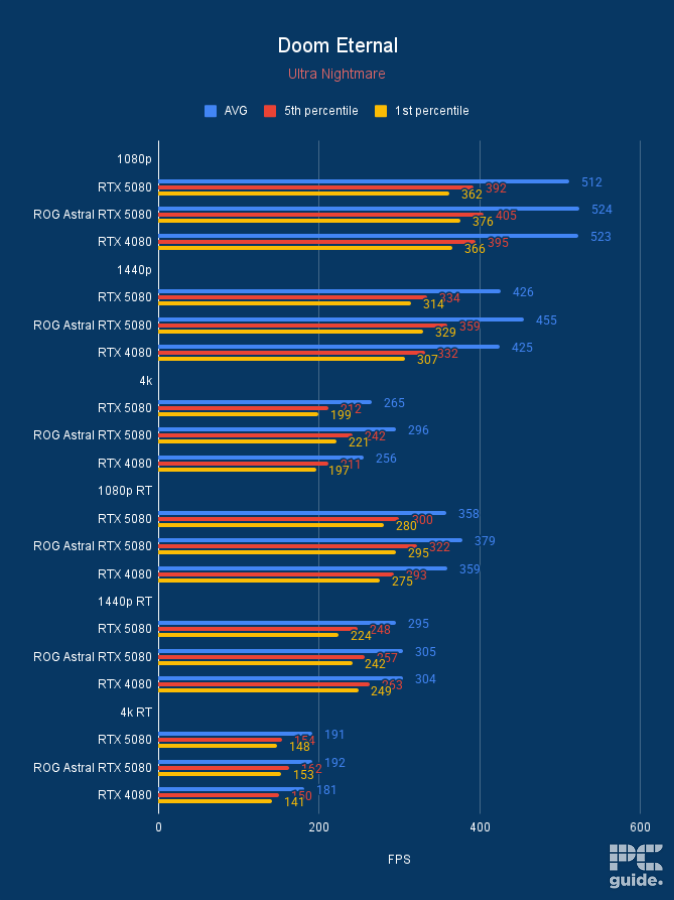
ROG Astral RTX 5080 OC Doom Eternal, Image by PC Guide
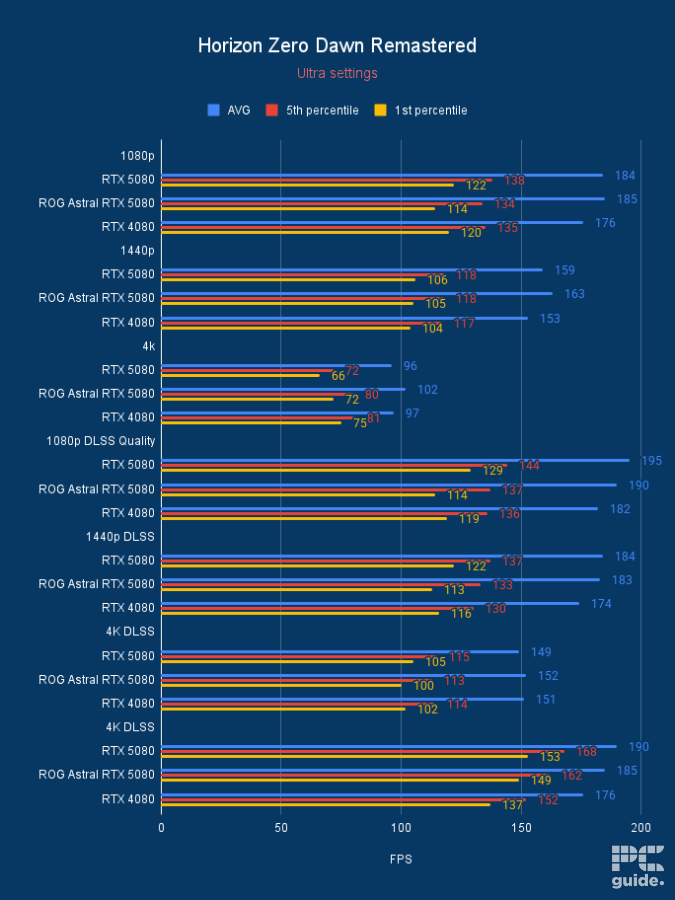
ROG Astral RTX 5080 OC Horizon Zero Dawn Remastered, Image by PC Guide
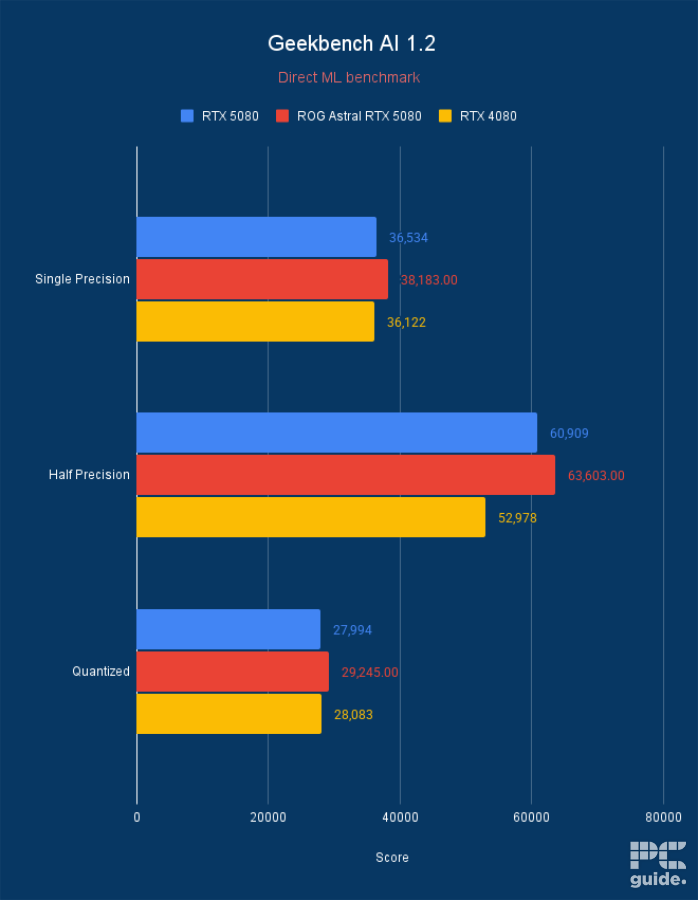
ROG Astral RTX 5080 OC Geekbench AI 1.2, Image by PC Guide
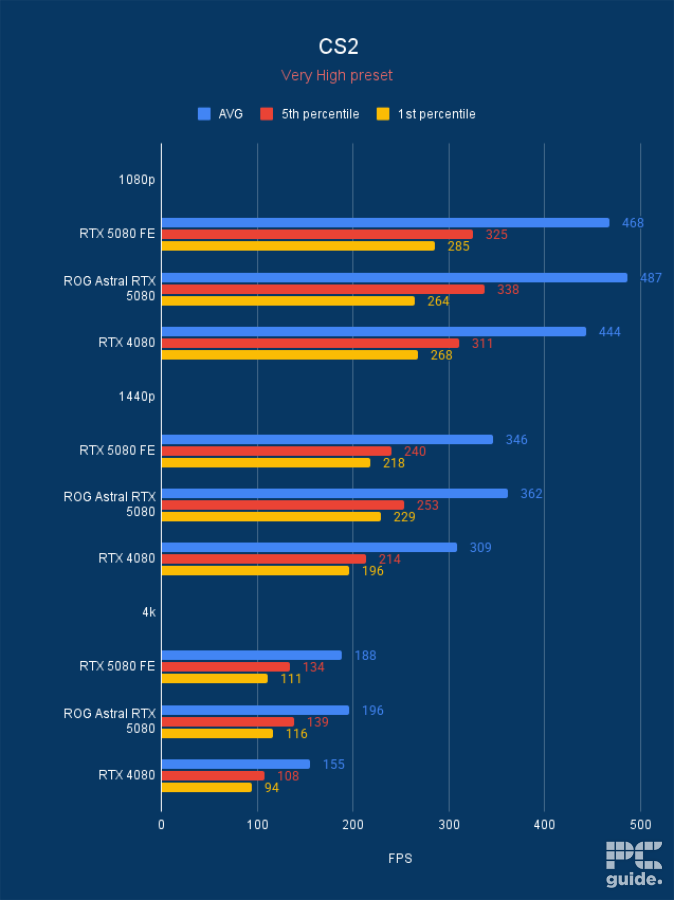
ROG Astral RTX 5080 OC CS2, Image by PC Guide
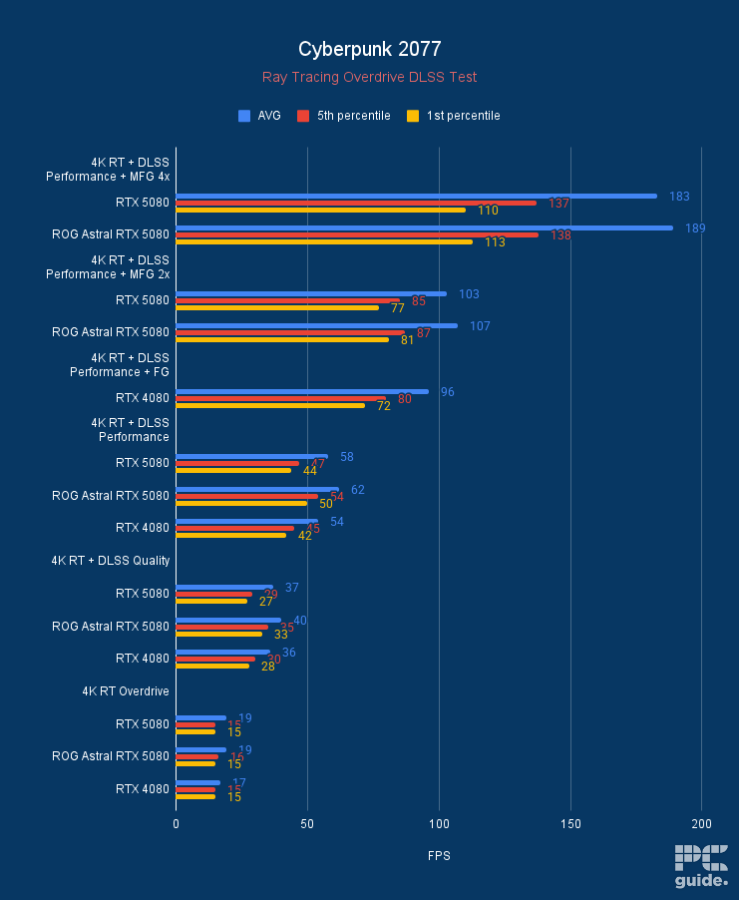
ROG Astral RTX 5080 OC Cyberpunk 2077 DLSS, Image by PC Guide
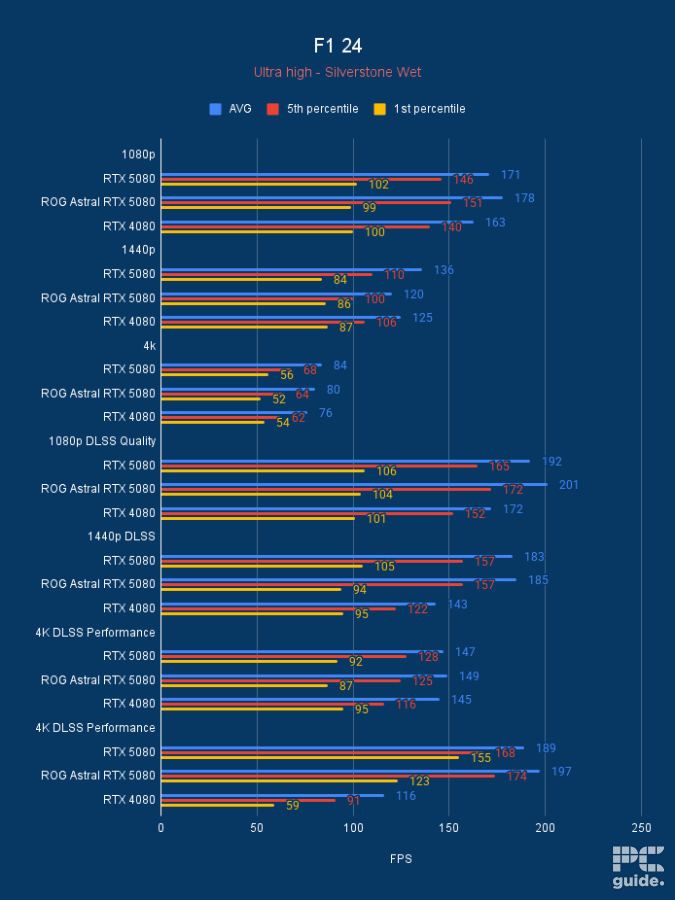
ROG Astral RTX 5080 OC F1 24, Image by PC Guide
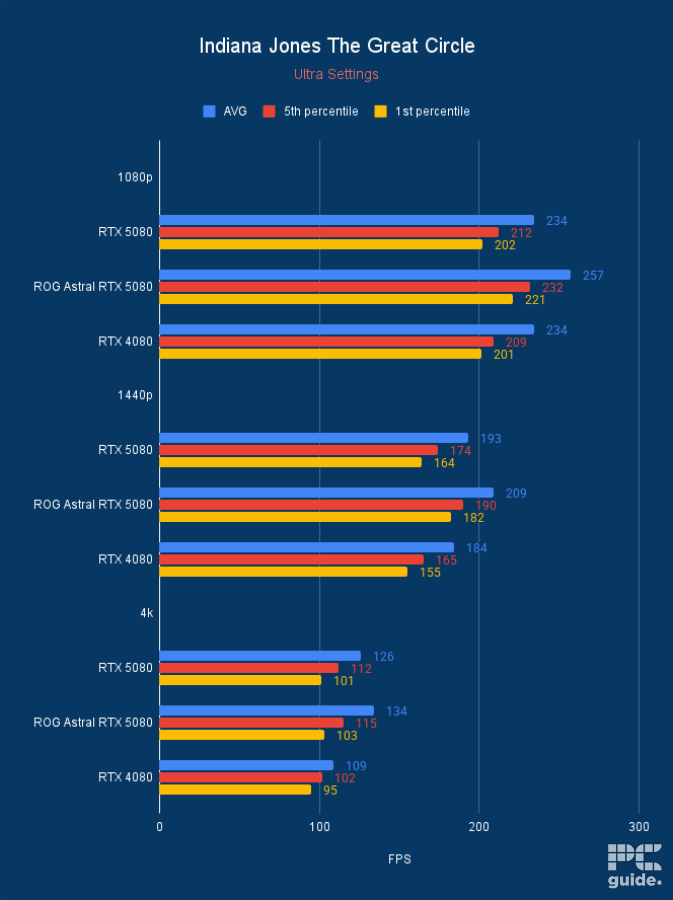
ROG Astral RTX 5080 OC Indiana Jones The Great Circle, Image by PC Guide
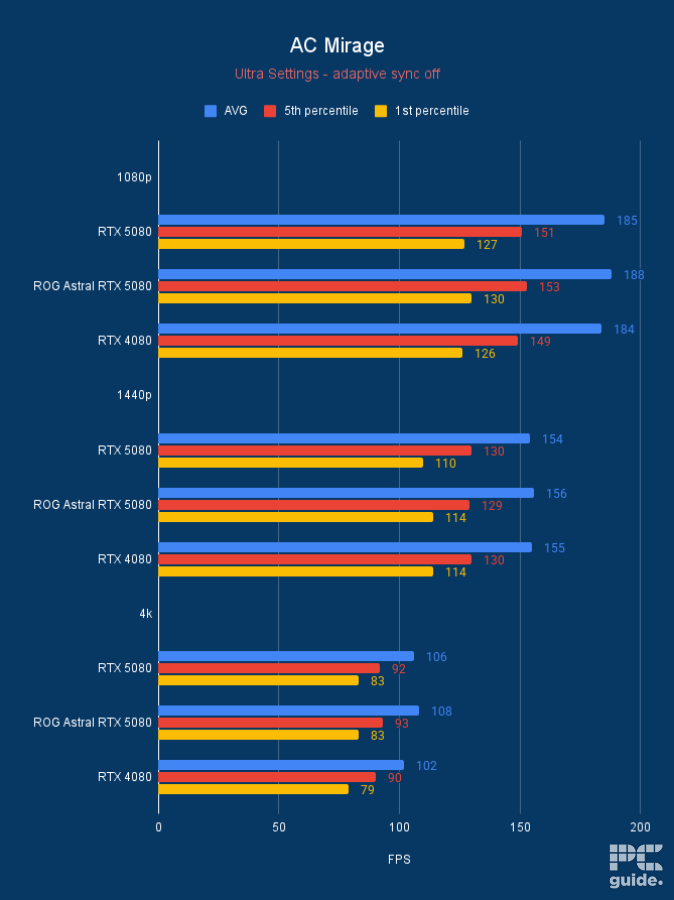
ROG Astral RTX 5080 OC AC Mirage, Image by PC Guide
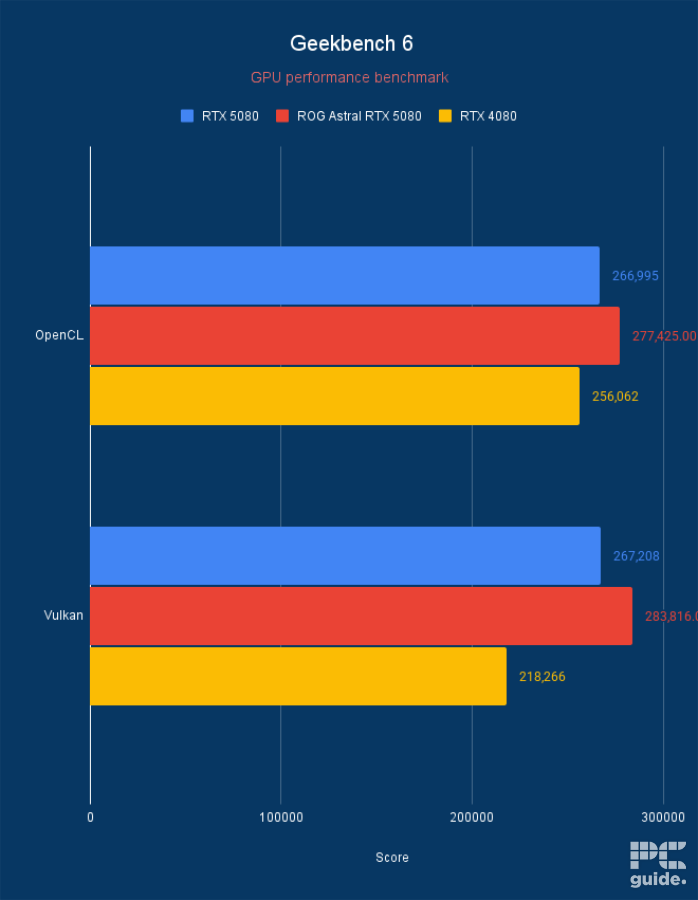
ROG Astral RTX 5080 OC Geekbench 6, Image by PC Guide
Previous
Next
Best Nvidia GPU for the 9850X3D
02
Specifications
- GPU: GB202
- CUDA cores: 21,760
- VRAM: 32GB GDDR7
- Memory Bus width: 512-bit
- Base clock speed: 2,010MHz
- Boost clock speed: 2,565MHz
On the other hand, if you do want to get the most out of the RTX 50 series, the RTX 5090 is the one to go for. Doubling up the memory and CUDA count of the card to 32GB and 21,760, it’s ideal for crunching numbers and getting high framerates across the board.
We have tested two models of the RTX 5090, too, in the MSI Suprim SOC and the ROG Astral BTF. These offer a variety of designs, features, and specs in their boost frequencies. One of the standouts of those is the BTF connector on the ASUS ROG card that works with its motherboards to bypass the power connector, but at a higher cost.
From our benchmarks of the 5090’s, we found what it was capable of. There in CS2, at 4K, it averaged 311 & 298fps, 1440p it averaged 507 and 485fps, and at 1080p a whopping 627 & 600fps. In Cyberpunk standard, 4k averaged 110 &114fps, 1440p averages 217 & 212fps, and at 1080p 231 & 233fps. With ray tracing turned on, those become 60 & 59fps, 1440p is 112 & 108fps, and at 1080p, 153 & 152fps.
In the productive workloads, in 3DMark, the 5090 achieved a score of 34,906 in FSU, 26,063 in TSE, 38,424 in PR, and 14,702 in SN. While in Blender, it has an average sample rate of 7,404.84 in monster, 3,890.06 in junkshop, and 3,681.35 in classroom.
So with the high spec of the card, it is a well-rounded option for everything you throw at it. Be it gaming, productivity, or anything AI, the high memory count is a necessity that comes at a premium. So if you have the money for it, the 5090 is the choice for it.

ROG Astral RTX 5090 BTF OC Blender 4.3, Image by PC Guide
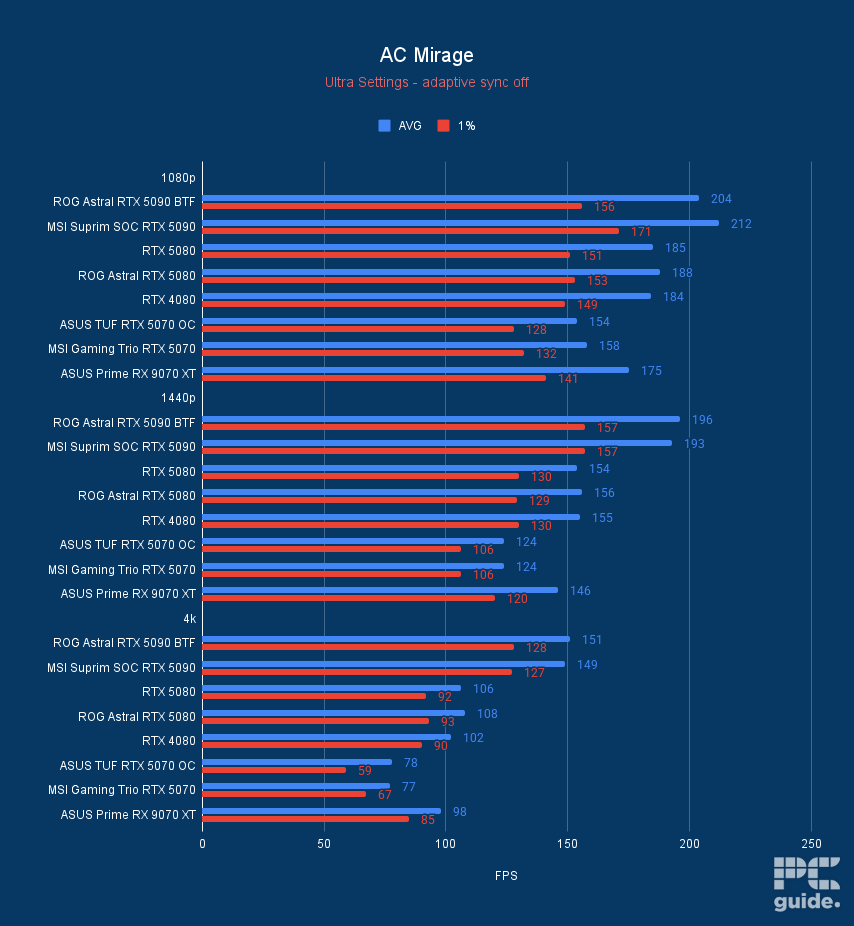
ROG Astral RTX 5090 BTF OC AC Mirage, Image by PC Guide
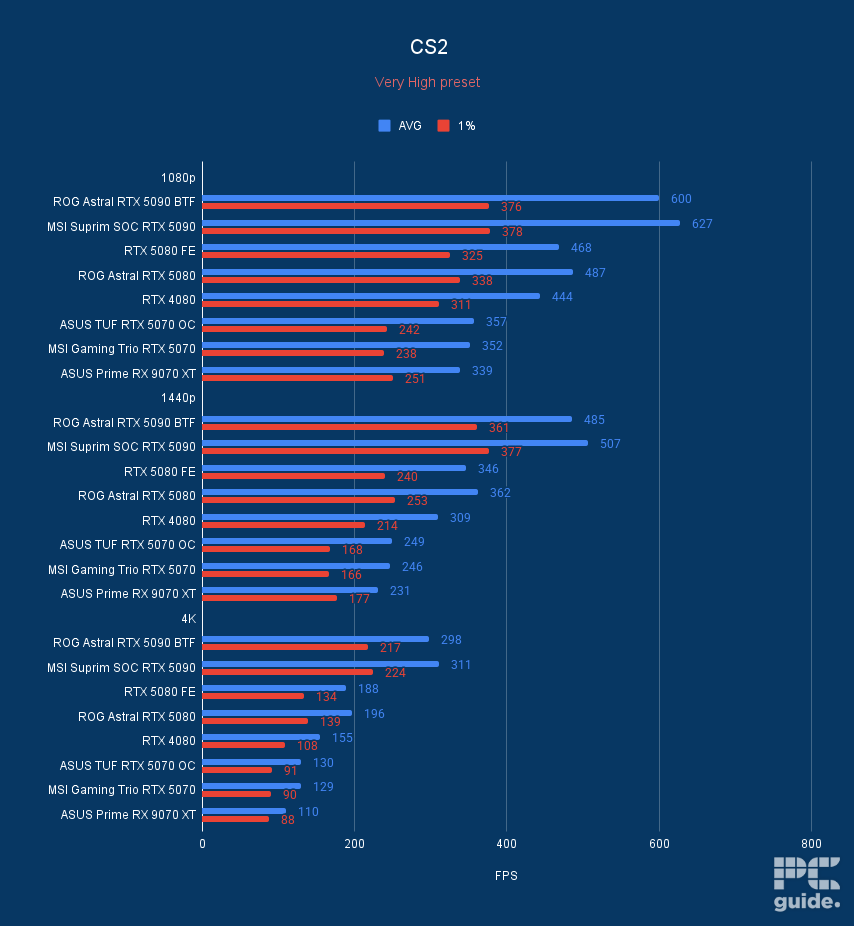
ROG Astral RTX 5090 BTF OC CS2, Image by PC Guide

ROG Astral RTX 5090 BTF OC Doom Eternal, Image by PC Guide
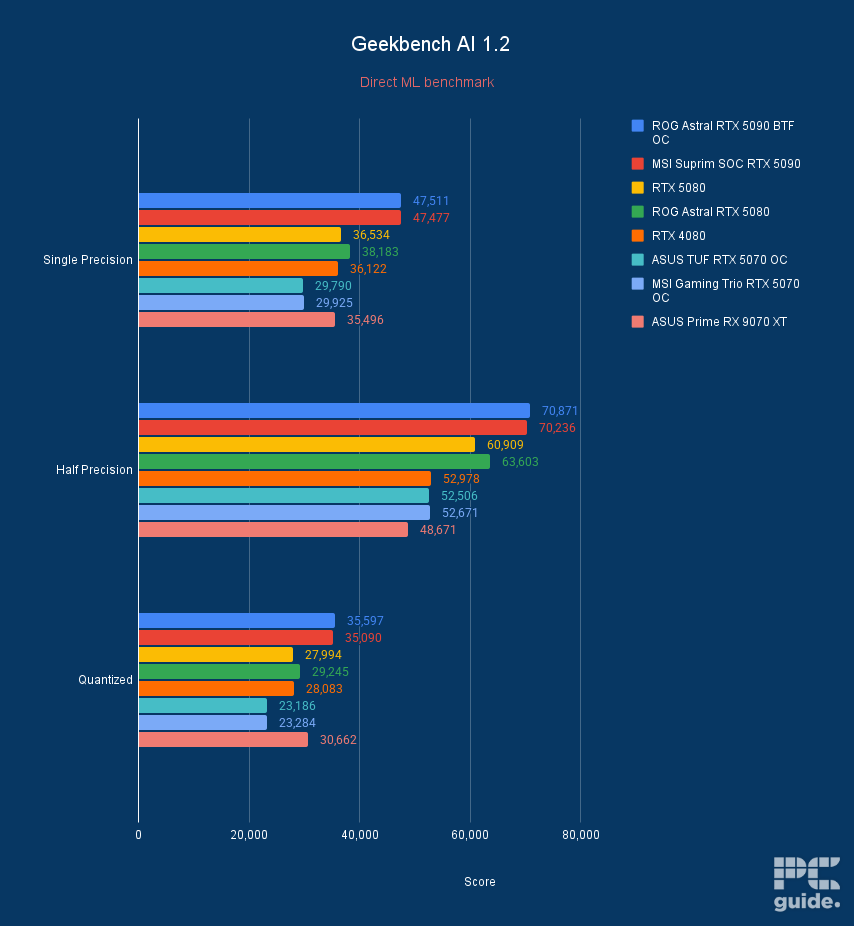
ROG Astral RTX 5090 BTF OC Geekbench AI, Image by PC Guide
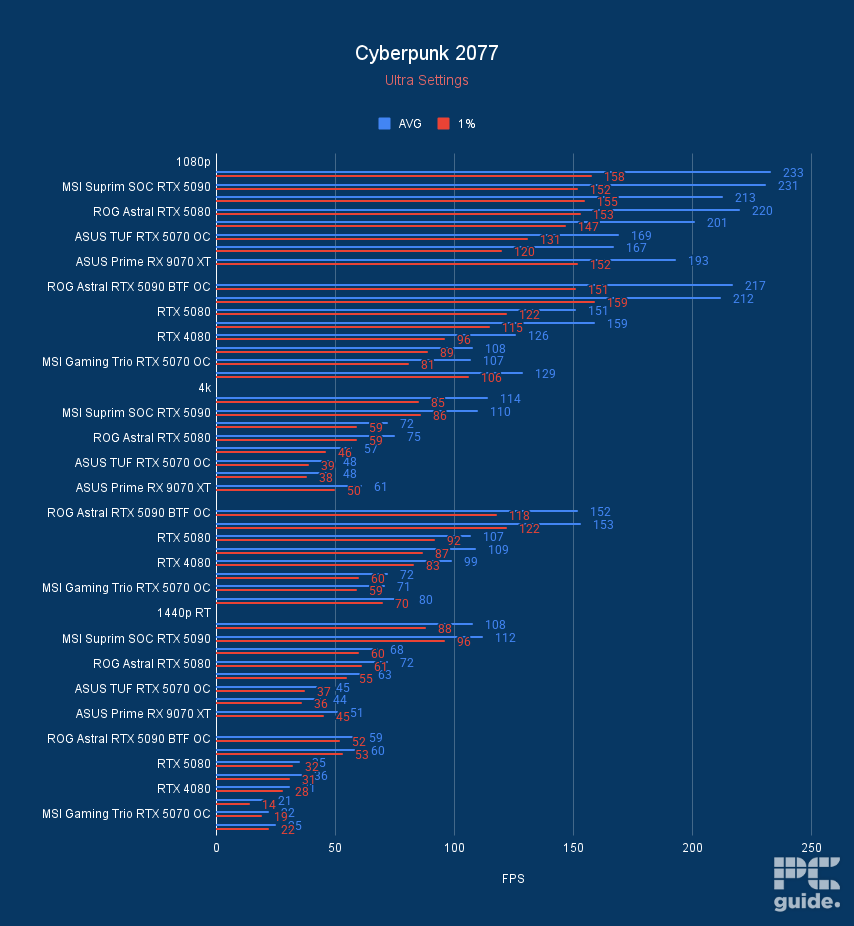
ROG Astral RTX 5090 BTF OC Cyberpunk 2077, Image by PC Guide
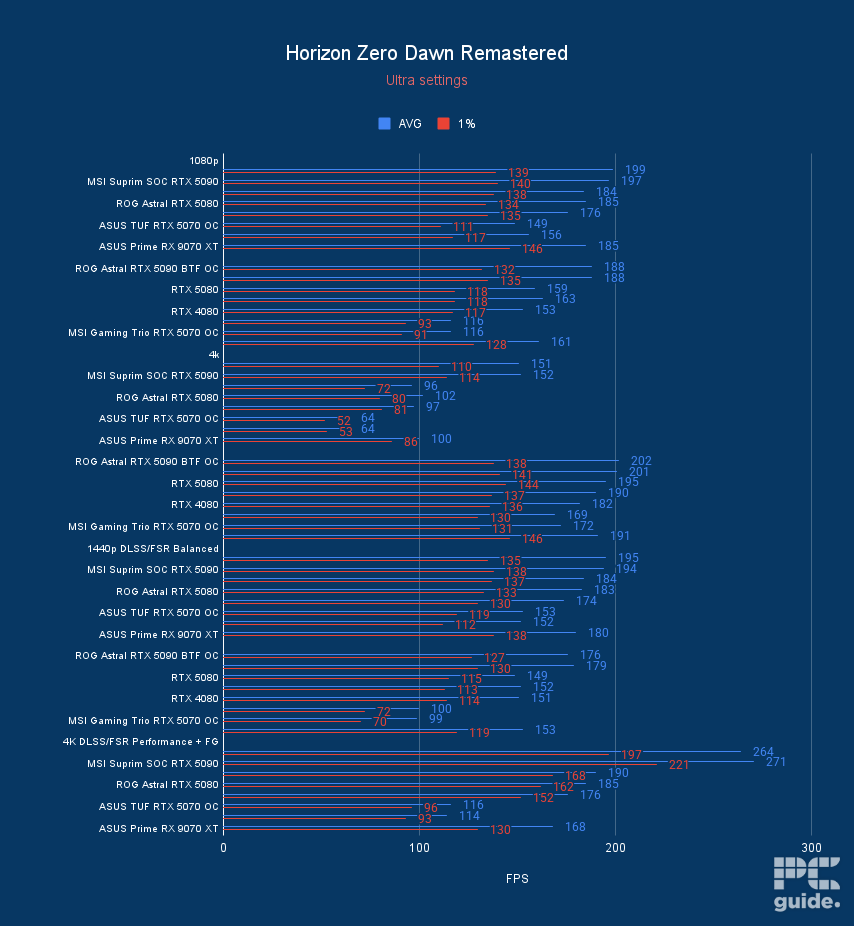
ROG Astral RTX 5090 BTF OC Horizon Zero Dawn Remastered, Image by PC Guide
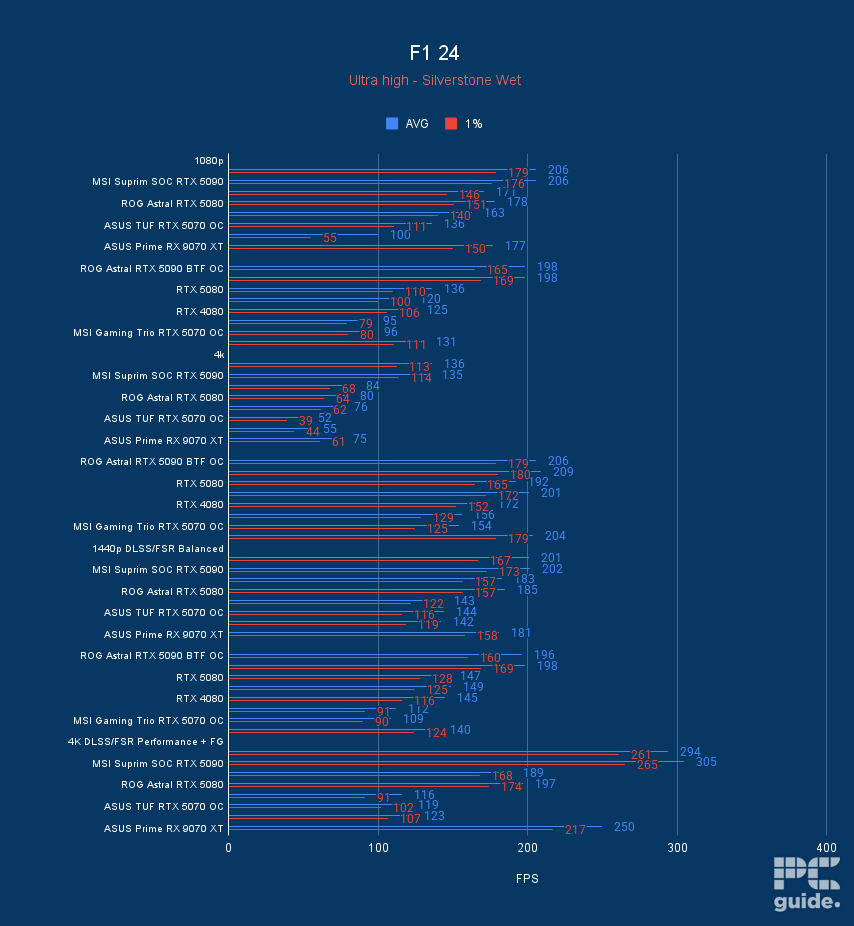
ROG Astral RTX 5090 BTF OC F1 24, Image by PC Guide
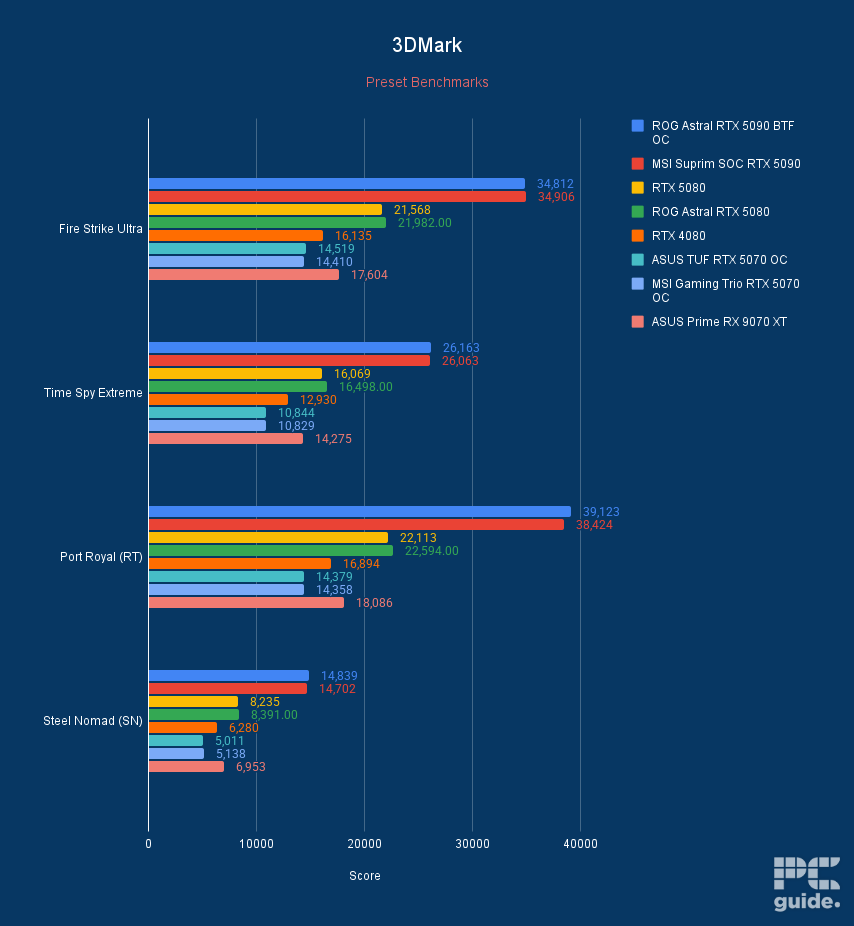
ROG Astral RTX 5090 BTF OC 3DMark, Image by PC Guide

ROG Astral RTX 5090 BTF OC Cyberpunk 2077 DLSS 4, Image by PC Guide

ROG Astral RTX 5090 BTF OC Indiana Jones The Great Circle, Image by PC Guide
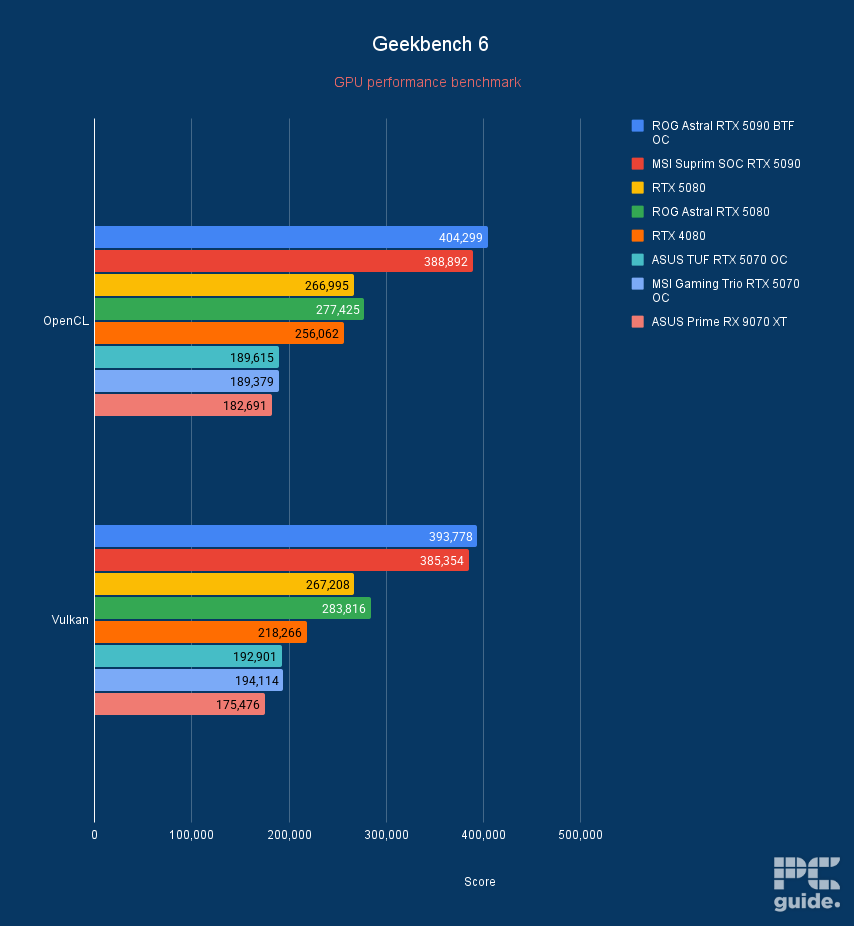
ROG Astral RTX 5090 BTF OC Geekbench 6, Image by PC Guide
Previous
Next
Best AMD GPU for the 9850X3D
03
Specifications
- GPU: Navi 48 XT
- Stream Processors: 4,096
- VRAM: 16GB GDDR6
- Memory Bus Width: 256-bit
- Base/Game/Boost clock speed: 1,660/2,400/2,970 MHz
- TBP: 304W
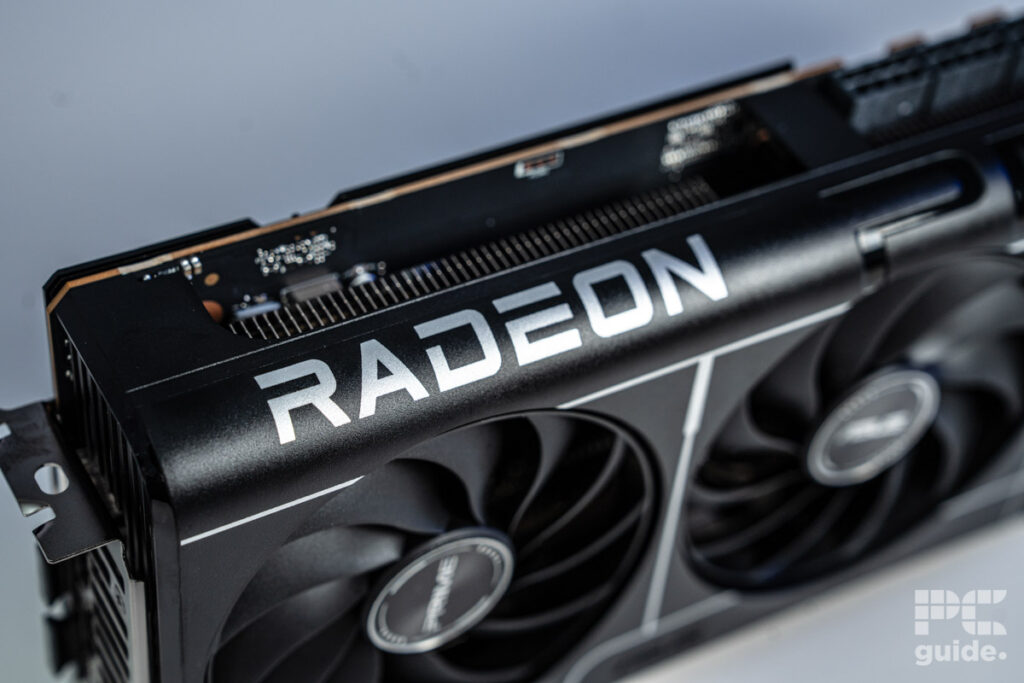
If you want to pair up your AMD CPU with an AMD GPU, then the obvious choice is the RX 9070 XT that released as the flagship from the RDNA 4 family. With a lot of improvements in the performance of gaming, ray tracing, and even other workloads, that makes the Radeon card is even more appealing compared to Nvidia. Particularly with the price it came out at, even if after that it was a bit more expensive.
For the testing of the card, we got our hands on the ASUS Prime model, a sleek and light design that still has a lot of power behind it. So we put it to the test to see how well it did across the board. In Cyberpunk at 1080p averaged 193fps, 1440p averaged 129fps, and at 4k averaged 61fps, then with RT on, those become 80, 51, and 25fps.
Then in 3DMark, it achieved a score of 17,604 in FSU, 14,275 in TSE, 18,086 in PR, and 6,953 in SN. This does mean the GPU is a good option for 1440p and 4K gaming with the ability to even do some creative work. Even though its not quite as powerful as Nvidias hardware, the card comes at a considerable value in comparison.
Plus, it does get access to AMD’s own upscaling and features to take advantage of and get more out of it. ISo with a strong value gaming GPU, the 9070 XT is the way to go.
Best budget GPU for the 9850X3D
04
Specifications
- GPU: BGM-G21
- Shading units: 2,560
- VRAM: 12GB GDDR6
- Memory bus width: 192-bit
- Bandwidth: 456GB/s
- Base/Boost clock speed: 2,670/2,740 MHz
Instead, if you’re looking for a budget GPU, Intel is currently taking up the spotlight in that price range. The latest generation of Battlemage cards is coming with a bunch of improvements and greater driver support across a better range of software and games. At the top of the stack is the Arc B580, with the full range of specs offered by the Arc cards.
We’ve covered three different cards from the lineup: the Sparkle Titan OC, the Maxsun iCraft, and the Acer Nitro. They vary in the whole design, particularly with their length, as Acer is just a two-fan model compared to the three fans of the other two. Then they vary in the max boost clock they are capable of reaching.
In benchmarking, and CS2 first, the B580 averaged 168fps at 1080p, 124 at 1440p, and 64 in 4k. In Cyberpunk, that became 94 and 62 fps at 1080p and 1440p, with ray tracing dropping to 38 and 24fps. 4K is not a playable option on the GPUs for the game.
When it comes to the productivity of the GPU, in 3DMark, it achieved a score of 7,971 in FSU, 6,916 in TSE, 7,913 in PR, and 3,089 in SN. While in Blender, the B580 achieved sample rates per minute of 889.2 in monster, 443.2 in junkshop, and 463.8 in classroom.
So in the case of the Intel Arc B580, it’s an ideal option for 1080p gaming, even pushing 1440p thanks to its higher memory count. Beating out the RTX 4060 from Nvidia in our tests, however, not in the creative workloads and productivity tasks. As the Intel architecture isn’t as capable in those as Nvidia. So it’s only really a good choice if you are mainly going for gaming.

Acer Nitro Intel Arc B580 Blender, Image by PC Guide

Acer Nitro Intel Arc B580 CS2, Image by PC Guide

Acer Nitro Intel Arc B580 Cyberpunk 2077, Image by PC Guide

Acer Nitro Intel Arc B580 Geekbench, Image by PC Guide

Acer Nitro Intel Arc B580 Geekbench AI, Image by PC Guide

Acer Nitro Intel Arc B580 Shadow of the Tomb Raider, Image by PC Guide
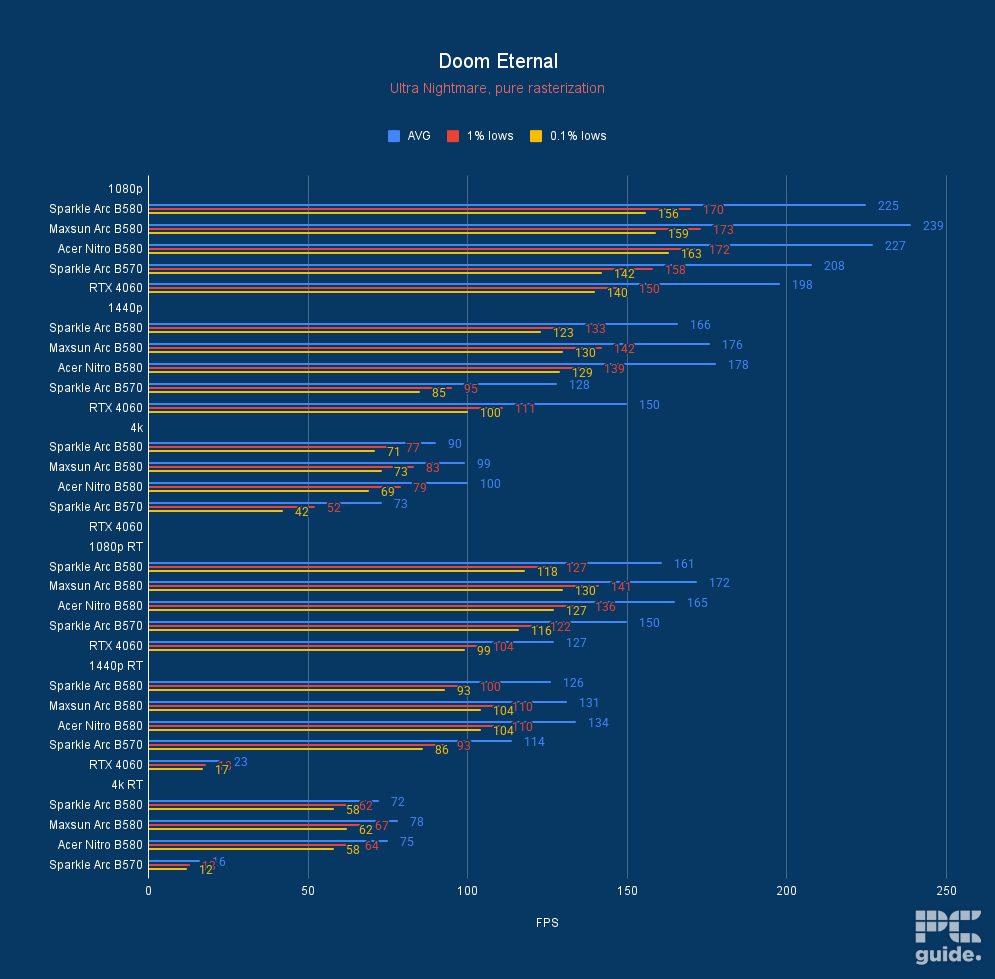
Acer Nitro Intel Arc B580 Doom Eternal, Image by PC Guide

Acer Nitro Intel Arc B580 Indiana Jones The Great Circle, Image by PC Guide

Acer Nitro Intel Arc B580 AC Mirage, Image by PC Guide

Acer Nitro Intel Arc B580 Horizon Zero Dawn, Image by PC Guide

Acer Nitro Intel Arc B580 F1 24, Image by PC Guide

Acer Nitro Intel Arc B580 HandBrake Average FPS, Image by PC Guide
Previous
Next
Considerations for the best graphics card
Now with that broad selection of hardware, there are a lot of choices to consider. But they might not all be equally good for you. There are certain considerations you might have between the various models and particular graphics cards, so we’ve outlined some of those to help you make that decision.
Budget
The first decision you want to make is how much you’re willing to spend on your graphics card. With so many varieties and models, it can be a hard choice, but once you know what your max is, you can start having a closer look. That will dictate what level of performance you can reach, and then find the model that gets the most value out of it.
There are a bunch of options from budget to the flagship, with thousands or hundreds of dollars between them. So you can get the most value by not overspending and getting just what you need, and being able to put more into the other hardware too.
Size
With various models for the cards, they often come in varying sizes. More often than not, the more powerful cards with the highest thermal design do require the biggest coolers. That is to ensure they keep your GPU cool and performing at its optimal level.

This can cause compatibility issues when it comes to actually building out your PC. With the cards getting longer and bigger, it can come up too close to the front of the case and not fit at times. In which case, a smaller GPU might be what you need instead, and you will want to double-check the clearances before you commit.
Resolutions
One of the big ways to know what kind of graphics card you need depends on what monitor resolution you’re planning on running. So if you have a 4K monitor, or even a 1440p one, you’re going to need something a lot more capable and powerful, as the larger number of pixels requires more to run.
That is true even if you’re running 1080p but want higher frame rates. If you’re looking for an esports-capable setup, a powerful GPU can get you hundreds of fps to run those high refresh rates.
Use cases
Another way to decide between various cards, particularly between choosing architectures, is their proficiencies and what you will be using them for. When it comes to gaming, most of the options will be fairly similar at the same level, and it will mostly come to the value, the features they offer, and the support they have.
However, if you’re looking to do creative work with the likes of rendering, LLMs, and more, then the efficiencies of the architectures matter a lot more. Nvidia’s CUDA cores do make a big difference, and that might be more appealing than say AMD’s streaming processors or even Intel. But they come at a cost, so it might have to be a good enough reason to consider.
Do you need a GPU for a 9850X3D?
Not necessarily, but for good graphics performance, it is highly recommended. It does have integrated graphics, but it’s not a replacement for discrete. A discrete graphics card is much more capable of reaching incredible framerates and supports a wider range of features, and is capable of doing a lot more.
However, if you aren’t planning on running games or requiring a lot of graphical work, then you can just use the iGPU. Since AMD has added onboard graphics to all its AM5 CPUs by standard, it does allow you to use it standalone.
Does the 9850X3D have onboard graphics?
Yes, as an AM5 processor without an F suffix means the 9850X3D does have onboard graphics. The iGPU is not a replacement for a discrete GPU, as you just have to look at the size of the two to realise they’re not comparable in performance. However, it does allow you to have a simple and quick video output to utilize, be it for troubleshooting or some light browsing.
What GPU does the 9850X3D have?
The iGPU on the 9850X3D is an AMD Radeon Graphics chip with two graphics cores. They are capable of running up to 2.2GHz and have the option to use USB Type-C DisplayPort output if your motherboard supports it.