Chrome Is Getting One-Click Unsubscribe Option for Desktop Also
Readers help support Windows Report. We may get a commission if you buy through our links.

Read our disclosure page to find out how can you help Windows Report sustain the editorial team. Read more
Google is about to make it much easier to block unwanted website notifications on your computer. The one-click unsubscribe button, which has been available only as a one-tap button on Android phones until now, is coming soon to Chrome for Windows, Mac, Linux, and ChromeOS.
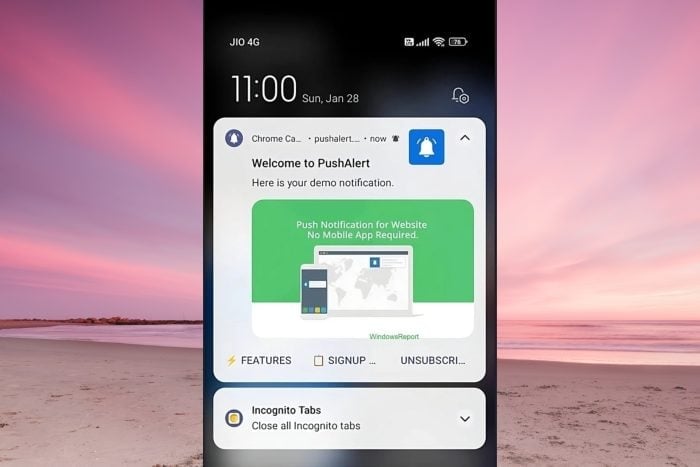
Last year, I was one of the first to spot that Google was testing a new unsubscribe button for Chrome notifications on Android. This feature allowed people to block notifications from a website with just one tap, rather than having to navigate through confusing settings menus.

In September 2024, Google announced that this simpler unsubscribe button would be rolling out to more Android phones. The company also said that it reduced annoying notifications by 30 percent on devices that had the feature.
Chrome Is Getting a One-Click Unsubscribe Option for Desktop, Also
Now, Google is bringing the same convenience to Chrome on desktop computers. While Google is working on using AI to block popups in Chrome, you will soon have a one-click unsubscribe button for notifications. The feature will soon be available to try out in Chrome Canary using a new feature flag. Here is the flag description:
“Adds an “Unsubscribe” action to web push notifications that lets you stop notifications from a website with a single tap (click) (with an option to undo).”
Once this is live, you’ll see an Unsubscribe button right in the notification itself. Click it, and that website’s notifications will be blocked. If you change your mind, you’ll also have the option to undo your choice immediately.
That’s not all. Chrome is also testing features like blocking Picture-in-Picture (PiP) videos from screen captures, as explained in this privacy update, and automatically upgrading passwords to Passkeys.
Additionally, Chrome could soon get a rollback option for tracking protection and AI-powered price estimation using Gemini during Buy Now Pay Later payments.