Five reasons why I use an email alias, and you should too

Dhruv Bhutani / Android Authority
Take a minute and think about your primary email address. If you’re anything like me, it is highly likely you’ve used the exact same handle for the last five, 10, or even 15 years. This email address is tied to everything from your bank accounts to your social media profiles, your tax documents, and your healthcare apps. Basically, all the important stuff.
However, at the same time, this same email address is used for throwaway websites, to read one-off articles, log in to public Wi-Fi, or buy something from an online store. We treat our email addresses as the key source of identification on the internet, but in the modern landscape of the internet, exposing your true email address to every database willy-nilly is an utter liability.
Everyone protects their passwords. However, email is the identifier that ties every account you own.
The reality of the modern internet is that your personal data is a commodity, and your primary email address is essentially a tracker used to stitch that commodity together. Every corporate database breach or aggressive marketing campaign connects the dots using your email address and chips away at the security and, dare I say, sanity of your digital life.
Over the past few years, I completely redid how I interact with online services by adopting a strict email alias system. By utilizing a custom domain coupled with an email alias, I never give out my real email address to anyone outside of my immediate personal and professional circles. It is easily one of the best choices I have made for my digital hygiene, and it is a strategy you should adopt immediately if you want to reclaim control over your inbox.
Have you used/considered using an email alias before?
150 votes
Killing spam at the source

Dhruv Bhutani / Android Authority
Traditional spam management is reactionary by nature. Your email provider runs your incoming messages through complex, algorithmic filters that try to guess whether a message is legitimate or malicious. Sometimes the filter works perfectly, but often times an important confirmation email lands in the junk folder, or a highly sophisticated phishing attempt slips directly into your main inbox.
When your primary email address is leaked to a spam network, you are essentially stuck playing a permanent game of whack-a-mole, reporting individual senders and creating custom block rules that spammers can easily circumvent by slightly altering their outbound domains. That’s quite literally how spam filtering works.
Email aliases turn spam management from a reaction into a prevention strategy.
But with an email alias, you get a bit more control over this power dynamic by being able to cut off spam at the source. When I sign up for a service, I use a dedicated, unique email address specifically for that entity or source type. For example, subscriptions get a subscriptions@emailaddress alias, while newsletters get another. If that service eventually sells my information or suffers a data breach that lands my address on a global spam list, I do not have to spend weeks training a spam filter or blocking individual messages. Instead, I simply log into my alias dashboard and toggle a single switch to deactivate that specific address.
When an alias is deactivated, any email sent to it is instantly dropped at the server level. It never reaches my inbox, it does not clutter my spam folder, and it needs no other input on my end. The sender receives a delivery failure notification, signifying that the address no longer exists. This approach turns email management into a proactive defense mechanism. Instead of trying to filter out the bad noise from a single, compromised pipeline, your email, you get a series of individual controls that you can shut off the second they start leaking into your inbox.
Identifying where data leaks happen

Dhruv Bhutani / Android Authority
We have all experienced a sudden influx of sketchy marketing emails or phishing attempts targeting our inboxes at some point or another. One day, your inbox is perfectly clean, and the next, you are receiving urgent alerts about a compromised package delivery or a cryptocurrency investment opportunity you never made.
In a standard setup, it is completely impossible to trace the origin of this spam. You are left wondering which of a hundred different applications, services, or stores was careless with your contact information. Using unique aliases completely eliminates this mystery and introduces accountability to your online transactions.
Instead of filtering unwanted emails, you can simply shut off the address that leaked.
When every single company receives a completely distinct email address, the sender field on a spam message becomes an immediate giveaway. If I start receiving suspicious solicitations or targeted scam attempts sent to an address that I generated exclusively for a local apparel retailer, I know with absolute certainty that the retailer either sold my data to a broker or suffered an unannounced data breach.
Like the aforementioned objective-led aliases, you can choose to toggle off this retailer’s alias. If you want to take it a step further, you can also report a data leak back to the merchant, something I ended up doing recently.
Limiting the reach of a data leak

Dhruv Bhutani / Android Authority
The danger of a corporate data breach goes far beyond just the account that got compromised. When a major service is compromised, malicious actors routinely harvest the exposed email and password combinations to conduct credential stuffing attacks.
Automated bots take these leaked credentials and attempt to log into thousands of other popular websites, including banking platforms, retail giants, and insurance portals. If you reuse passwords, a single breach can cause a domino effect that compromises your entire digital footprint. Even if you use a robust password manager to ensure every account has a unique password, relying on one universal email address still gives hackers half of the login equation for every account you possess.
Using one email everywhere gives attackers access to half the login equation.
By deploying individual aliases across your online accounts, you drastically minimize the impact radius of any single security incident. If a clothing website loses its user database to a cyberattack, the only login credential exposed is the specific alias created for that store.
Because that email address is not associated with your bank, your social media accounts, or your primary productivity tools, the stolen data is practically useless for credential stuffing. The attackers cannot use that email to guess your login on other platforms because that email simply does not exist anywhere else on the web.
This systematic isolation creates a system of digital firewalls around your personal life. High-security accounts, such as your primary financial institution or your main email provider, remain completely invisible to the broader internet because their associated login addresses are never exposed to low-security platforms like forums, online games, or retail applications.
You effectively decouple your financial and legal identity from your casual browsing identity, ensuring that a security failure at a minor online merchant cannot compromise the essentials of your digital existence.
Reducing the impact of advertising personalization and profiling

Dhruv Bhutani / Android Authority
The modern digital advertising machine relies heavily on identity resolution, which is the process of linking your behavior across different platforms, devices, and physical locations to build a comprehensive consumer profile.
While web browsers have made significant strides in blocking third-party tracking cookies, advertisers have shifted to more resilient identifiers. Your primary email address is, at the end of the day, the ultimate cross-platform tracking pixel. When you log into an app on your phone, buy something at a physical store that requests a digital receipt, or sign up for a loyalty program, your email address is hashed and added to a central database managed by data brokers.
Your email address is the internet’s most persistent tracking cookie.
These data brokers use your email address as a common denominator to stitch together disparate pieces of your life. They can connect your medical searches on a health forum to your purchasing habits at a grocery store and your location data from a weather app, creating an incredibly invasive profile used to serve hyper-targeted advertisements or manipulate your consumer choices.
Because your email address remains static, this profile follows you across different devices, operating systems, and years of internet browsing. Ever wondered how a Google search started surfacing Instagram Reels about a product? It’s not the only factor, but the same email address certainly is one factor.
Using a distinct email alias for every interaction largely breaks this tracking mechanism. When the data broker attempts to merge the database from a fitness app with the database from an online store, the email addresses do not match.
To the tracking algorithms, you appear as hundreds of completely unrelated individuals browsing the web in isolation. This effectively puts a stop to the advertising profiling engine and the continuous data feedback loop it requires to function, giving you back a massive degree of anonymity without forcing you to abandon the modern applications and conveniences you enjoy.
Segregating personal and professional inboxes

Dhruv Bhutani / Android Authority
Managing a single inbox might seem like an efficient approach, but at any given moment, a critical message from a close family member or an urgent notification from a business contact can be buried beneath a mountain of shipping confirmations, automated software alerts, weekly newsletters, and promotional discounts.
Many people attempt to solve this chaos by setting up intricate inbox folders, color-coded labels, and automated filtering rules within their email clients. I tried that approach too. However, those solutions rarely stick, requiring constant maintenance and failing the moment a company alters its email subject lines or sending addresses.
The easiest way to manage email overload is to stop mixing unrelated conversations in the first place.
You can achieve true segregation much more elegantly at the routing layer by deploying email aliases. By categorizing your aliases into distinct buckets, you can completely control the flow of information before it ever lands in your inbox. You can configure your alias system to route promotional emails and newsletter subscriptions to a secondary, low-priority inbox that you only check once a week, while ensuring that emails sent to your personal and professional aliases bypass all filters to land directly in your primary view.
This structural segregation of emails not only makes sorting through emails much simpler, but it also helps prevent the mental fatigue that comes from seeing work-related threads or nagging notifications during your personal time, and it keeps your primary communication channel clean, focused, and not just useful, but usable. You no longer have to sift through a steady stream of noise to find the things that actually matter to your daily life, since most of that noise is already segregated to a lower-priority section.
How to get started with email aliases

Dhruv Bhutani / Android Authority
Transitioning to an email alias system might sound like an overwhelming technical task, but modern privacy tools have made the setup remarkably straightforward. You do not need to host your own mail server or possess advanced technical know-how to build a secure, scalable alias architecture.
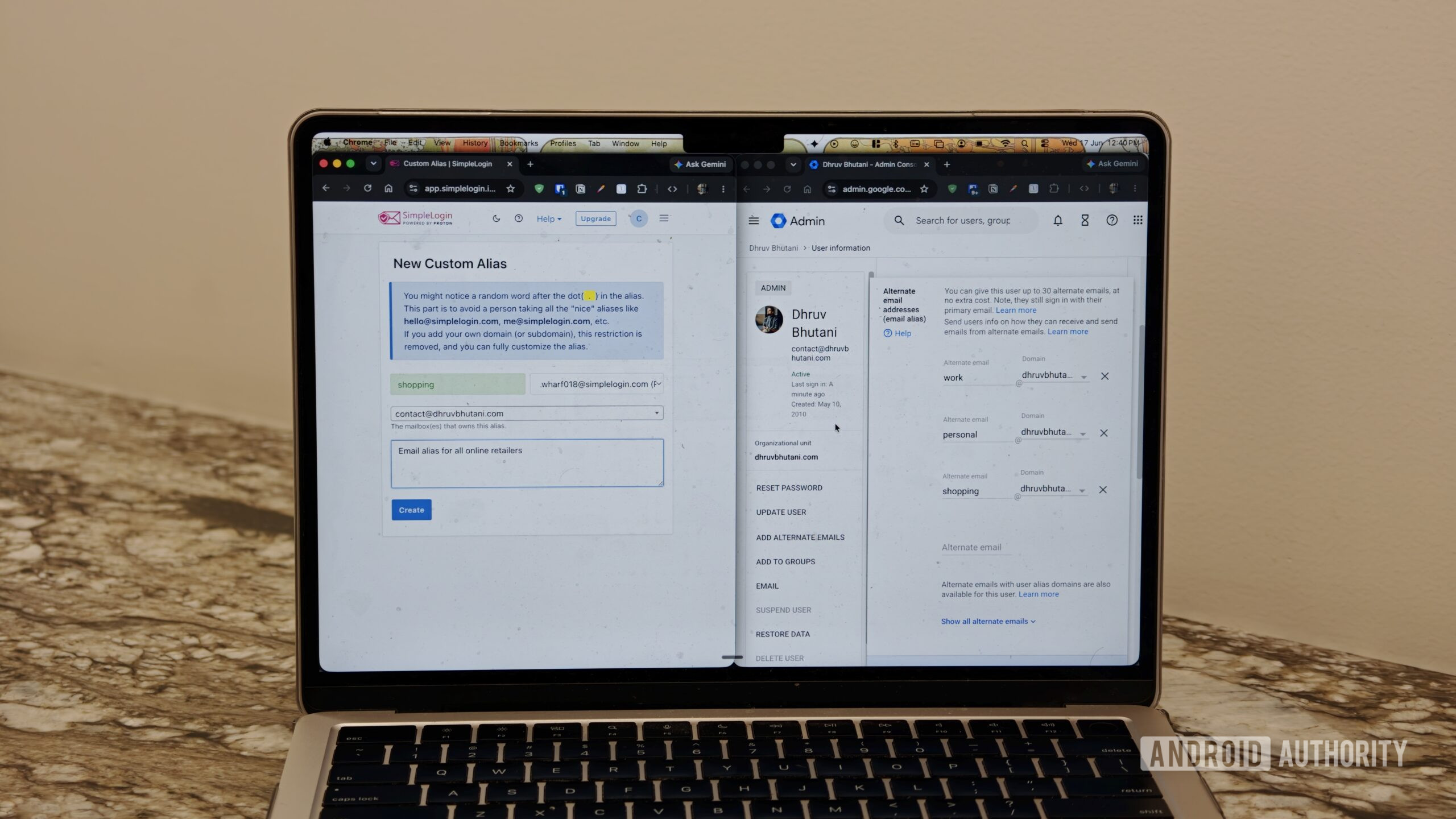
One of the easiest ways to achieve this involves picking up an inexpensive domain and linking it to a dedicated masked email service such as SimpleLogin or AnonAddy. If you use Google Workspace, Google provides built-in support for email aliases and lets you create up to 30 of them for free.
Alternatively, ecosystem providers like Proton Mail and Apple offer integrated alias features directly within their premium subscription tiers, allowing you to generate random addresses on the fly with a single click.
Once your domain or service is configured, you can begin implementing the system gradually. Just log in to your dashboard and create a new alias. Give it an appropriate label and description, and you are good to go. There is no need to spend an entire weekend changing the login information for every account you have ever created. Instead, I recommend adopting the habit of generating a new alias every time you sign up for a new service moving forward, or switching out the primary email address to an alias-based email address the next time you log into a service.
Building an alias system is simple, all it needs is changing one habit.
For your existing digital footprint, focus on updating your most critical accounts first, such as your banking applications, utilities, and primary social networks, over the course of a few days or weeks, and you’ll soon have a fully segregated setup.
As you slowly phase out your old primary email address, you will start noticing an immediate drop-off in inbox clutter. And the next time you hear of a data breach, you can rest assured that it’s unlikely that your primary email address got caught in the impact radius.
Let’s be real, your email address should be a private communication line reserved for people you actually know and trust, not a universal tracking token tossed out at every digital storefront on the internet. Taking control of your email architecture is a fundamental step toward reclaiming your digital sovereignty, and there is no better time, and arguably, no easier time to start than today.
Thank you for being part of our community. Read our Comment Policy before posting.