Kagi News is my new favorite Google News alternative

Andy Walker / Android Authority
One of the easiest ways to get the latest helping of news on Android is to boot up the Google News app. However, easy isn’t necessarily synonymous with best. Google News is plagued by several significant issues, including a tendency to promote inflammatory sources and inadequate tools for proper user content moderation. While I find it difficult to pull myself away due to its ease of use, these issues have slowly driven me to seek alternatives.
In that search, I’ve stumbled upon some unconventional solutions, from transforming Perplexity’s Comet browser into a full-time news tool to reconsidering the use of an RSS app. But whether it’s due to new service friction or old service familiarity, none of these methods has stuck.
Today, I’m highlighting a new challenger from a company that’s competing with Google in various other fields. Kagi is perhaps best known for its premium Google Search rival, but the firm also offers a range of other apps and services, including a comprehensive news app. And after using it for a few days, I might finally be ready to relegate Google News from my home screen to my app drawer.
Which news app do you currently use?
5 votes
What is Kagi News?

Andy Walker / Android Authority
Predictably called Kagi News, the app shares part of its name and most of its core purpose with its Google rival. It’s a news app, after all. But the two services couldn’t be more different.
Let’s start with the UI. I don’t think a user interface can get any simpler, especially for a news app. This isn’t a slight against Kagi by any means. In fact, the simple design makes it a wonderful app for those seeking an easy-to-navigate, efficient experience. The web experience is even simpler, and a far cry from Google News’ cluttered, sometimes overwhelming layout.
I don’t think a user interface can get any simpler, especially for a news app.
The news is divided into specific categories, covering topics like World, Business, Technology, and Sports. Tapping the Settings icon, then Categories, lets me hide, shuffle, or select the content silos I want displayed. I’ve added South Africa and Africa, but there is a truly extensive list of alternative options, including hyperspecific nested categories (Canada | Quebec or Ecology | France) and simpler options (Defense or Cycling). These tweaks ensure I can frontload the content I want displayed rather than let Kagi dictate what I see, as Google prefers.
There’s even a Today in History category that outlines major events from years past and important deaths and births in a neat timeline.
Bringing sense to dense news beats

Andy Walker / Android Authority
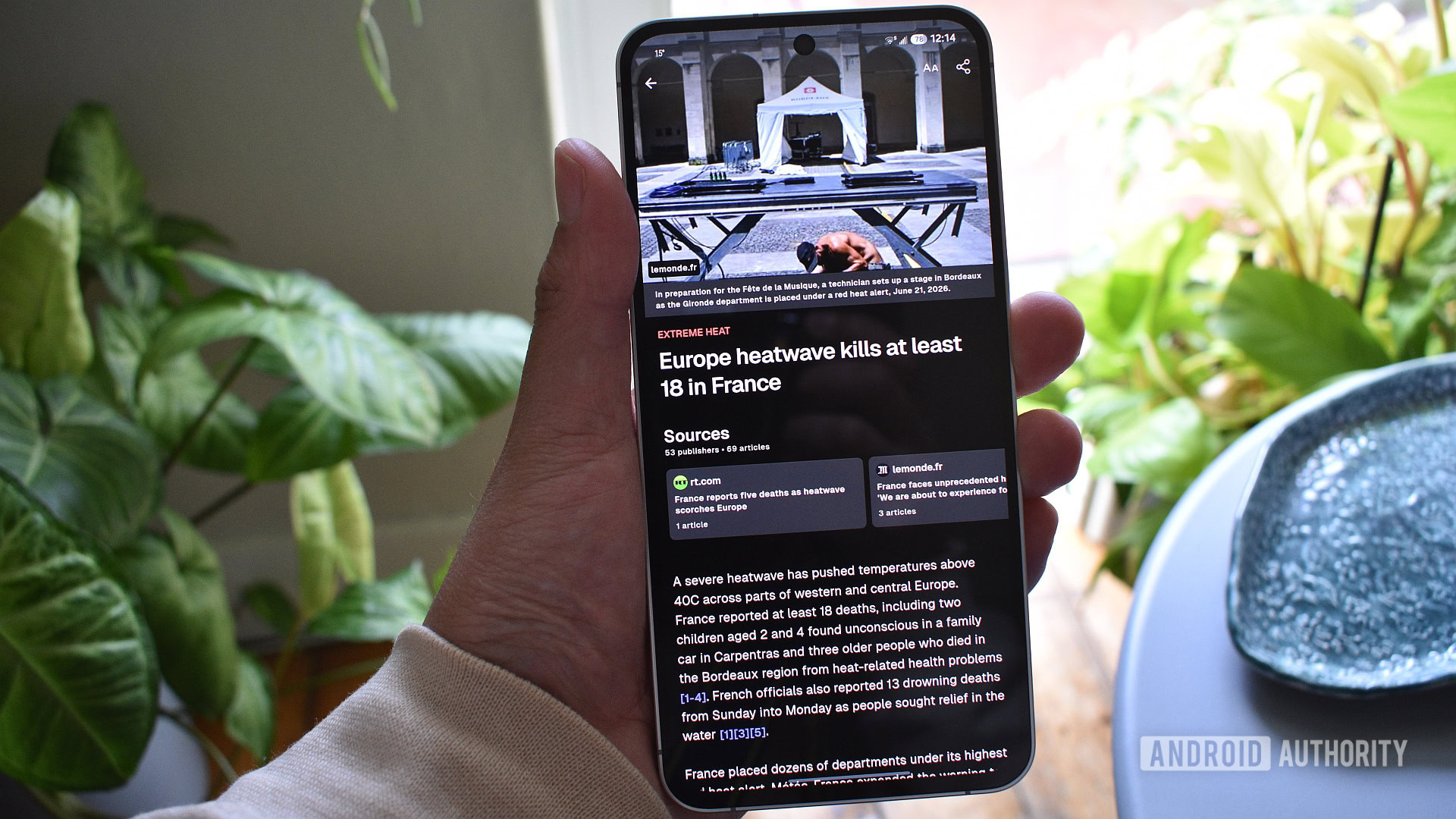
Back to the UI, and more specifically, the stories themselves. Tap on a headline to open a specific story — this is where the gap between Google News and Kagi News starts to widen. The former presents multiple articles per topic; however, Kagi condenses multiple articles from various sources into a single story using AI. This not only saves me from visiting multiple sites to get a balanced view of a news beat, but also combats Google News’s tendency to prefer articles with more divisive headlines, biases, and tones.
Google News displays multiple articles per topic. Kagi News compresses multiple sources into a single story.
Better yet, each Kagi News story includes several sections that offer broader context, including an outline of all the sources used (with links to each and in-text references), highlights to elucidate the key points of a story, perspectives from the key players, a brilliant historical background section that adds context to long-standing issues, and a timeline of events that charts the progression of the story. This is just a small sample. There are plenty of additional “Article sections,” as Kagi calls them, allowing even more customization.
Given its use of AI, another major difference you’ll likely notice is the headlines Kagi News uses. While Google News uses the titles provided by publications, many of which don’t adequately or accurately describe the story, Kagi News generates a completely neutral headline based on the content covered.
The World Tension Index (I prefer Meltdown Meter)

Andy Walker / Android Authority
Then there are the quirkier aspects of the Kagi News experience.
What might appear as a wildly inaccurate weather indicator sitting alongside the Settings icon at the top of the app is actually a “World Tension” index. The app explains that this indicator assigns a value to the global economic and political climate, with 0 indicating complete stability and 100 indicating total meltdown.
For the past two days, it’s sat at a comfortable 40, far lower than recent weeks. With this indicator, Kagi also offers context about the reading. Here’s an example from earlier this week:
Today’s instability is moderately above a typical baseline, driven by still-volatile US-Iran/Hormuz dynamics despite a de-escalatory 60-day roadmap, Ukrainian strikes halting fuel sales in occupied Crimea, and China’s new export controls on US defense-linked firms.
Is this index useful? I’m a bit of a sucker for a chart, and this certainly scratches that itch. If you’re not inclined to read every single story on the app, this index does a solid job of bringing sense to a facet of daily life that is often unquantifiable.
Content filters that actually work

Andy Walker / Android Authority
Users can also take advantage of several other content customization tools, like a comprehensive Content Filter section in the Settings menu. Here, I can choose how the app obfuscates content I don’t care about, highlight how many stories receive the filter treatment in each category, and select specific keywords to suppress.
If I don’t want to hear about the World Cup, for instance, I can tell Kagi News to stop mentioning the tournament here. It includes several ready-to-use filters, too.
Once I tinkered with the aforementioned features, got my categories in order, and selected my preferred article sections, Kagi News morphed into a remarkable news delivery app. It took a few minutes to get used to it, but after a week, I’ve found it difficult to get my news anywhere else.
Unlike Google News, it actually filters out content I don’t want to see, and thanks to how it handles information from the sources it acquires, there’s no need to navigate any hindering website furniture. Every story looks and behaves in the same predictable way, whether it covers the Tour de France or the Strait of Hormuz.
Kagi News’ AI summarization is a solution with a problem

Andy Walker / Android Authority
Despite my growing appreciation for Kagi News, I can’t quite turn a blind eye to its drawbacks, especially given its unique approach to condensing news.
While I appreciate the quality-over-quantity approach Kagi News favors, it imposes an arbitrary 12-story limit per category, with many categories rarely reaching that limit. Africa’s a pretty large continent; I reckon there are more than just seven pressing issues there. It’s especially disappointing that three of these are World Cup-focused.
There are also considerably fewer overall content updates per day compared to Google News. This makes me doubt if Kagi would be a viable option for breaking or rapidly evolving events. I certainly wouldn’t trust it over live blogs for developing stories.
Then there are the sometimes humorous errors that arise from its use of AI. I’ve found various naming errors, witnessed awkward phrasing, and pondered the placement of some articles in seemingly mismatched categories. This isn’t a game-breaking issue by any means, and I certainly prefer these smaller errors over Google News’ broader problems, but these little blips may undermine the platform’s perceived veracity.
Still, Kagi News does provide in-text references and source links for the content it summarizes. We, users, should be double-checking what the machines say at all times in any case.

Andy Walker / Android Authority
Then there are the perceived benefits of Google News that are absent from Kagi. Its Newsstand feature lets readers sample content directly from specific sources, something Kagi doesn’t quite offer in the same capacity. The ability to search for specific topics and publications is another advantage of Google’s service. I barely use either of these features, but that doesn’t mean others won’t miss them.
Kagi’s reliance on AI to condense multiple articles into a single stream can result in errors here and there.
Finally, there’s the big human problem with Kagi’s approach. For all of my qualms with Google News, there’s no doubt that it favors the content producers. It may favor certain headline and content styles, but these links still redirect to the actual publisher’s website, thereby giving these sites valuable virtual foot traffic.
Kagi’s approach of consolidating all sources into a single story stream largely negates the need to visit these individual websites. Given that I work in the industry and am acutely aware of how AI is changing it, this leaves a bitter taste in my mouth. However, speaking as a consumer, there’s little doubt that Kagi’s presentation of this information is far more approachable.
What feature do you find most appealing in a news app?
0 votes
Kagi News vs. Google News: Which service is best for you?

Andy Walker / Android Authority
My week with Kagi News has been rather enlightening. Unlike the company’s Search product, Kagi News actually does something starkly different from Google. It might initially seem like nothing more than a Google News clone, but its keen focus on distilling stories to their core threads makes it a more rewarding experience. I’ve been able to soak up otherwise complex stories in a matter of moments. Kagi News is undoubtedly the better overall news product.
That said, I do have my doubts. Will Kagi News remain free? How will its use of AI perturb potential users? Can the company iron out the little bugs and faults? I’m genuinely interested in how this platform will evolve over the coming months and years.
I’ll likely still keep Google News around in the meantime and dip into it every now and again. But if I need a detailed explainer of the current events, a snapshot of the global economic and political climate, or a view into the past, I’ll tap the Kagi News icon.
Thank you for being part of our community. Read our Comment Policy before posting.