Private Browsing Downloads Won’t Auto-Delete
Readers help support Windows Report. We may get a commission if you buy through our links.

Read our disclosure page to find out how can you help Windows Report sustain the editorial team. Read more
After updating the Firefox.com homepage for downloads, Mozilla is changing how Firefox handles downloads in Private Browsing with version 143, giving users the choice to either keep files or delete them when private windows are closed.
Till now, when a file, especially a PDF, is downloaded and automatically opened from a Private Browsing session, Firefox deletes it once the private window is closed. This happens even though the file is saved in the regular Downloads folder, where users expect files to remain.
Users often assume the file is permanent, since it looks no different from a normal download in both the Downloads folder and the Downloads panel. This behavior has been reported on Windows, Linux (including Ubuntu), and across multiple versions of Firefox.
Why It Worked This Way
Automatic deletion was designed to protect your privacy and keep your Downloads folder clean. The goal was to make sure files you downloaded during a private browsing session didn’t stick around, and to prevent temporary files from piling up. Previously, the main focus was on keeping your information private, even if it sometimes confused why files were disappearing.
Firefox 143 Lets You Decide: Keep or Auto-Delete Private Downloads
After reviewing feedback, Mozilla’s product and engineering teams have decided to change the behavior.
Firefox will no longer automatically delete downloaded PDFs and other files from private windows. Instead, users will be prompted to choose whether they want to keep or delete a file when downloading in Private Browsing mode.

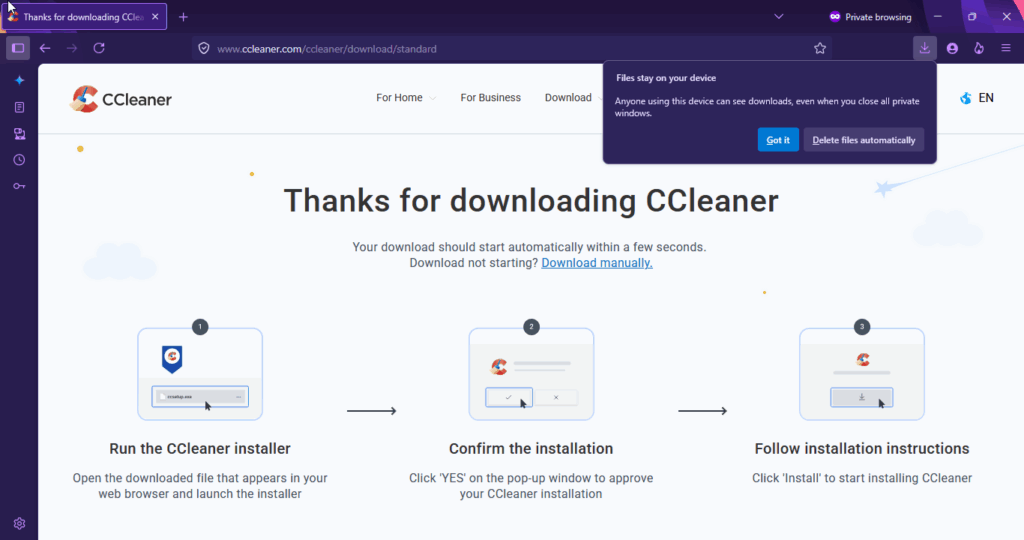
When downloading in Private Browsing, Firefox now shows a prompt that warns: “Files stay on your device. Anyone using this device can see downloads, even when you close all private windows”. Users then see two options: “Got it” or “Delete files automatically”.
Users can also change this in Settings > General > Downloads, where there’s an option “Delete files downloaded in private browsing when all private windows are closed” to turn automatic deletion on or off. Advanced users can adjust it further in about: config.

Other browsers like Chrome and Edge keep downloads from Incognito or InPrivate windows, removing only history and cookies. PDFs are saved normally, while in Firefox, they’ve been treated as temporary files that vanish when the session ends.
That’s not all. Firefox will soon be able to reinstall itself when you upgrade to Windows 11