The Best Free VPN for Windows?
In our ongoing quest to find the best VPNs for Windows, we got our hands on X-VPN from Singapore-based company LIGHTNINGLINK NETWORKS PTE. LTD.
The cross-platform VPN protects up to 5 of your devices, and the Windows app has one of the best combinations of features we’ve seen.
X-VPN Features
Let’s take a closer look at how X-VPN works and performs:
Select Servers from 80 Countries
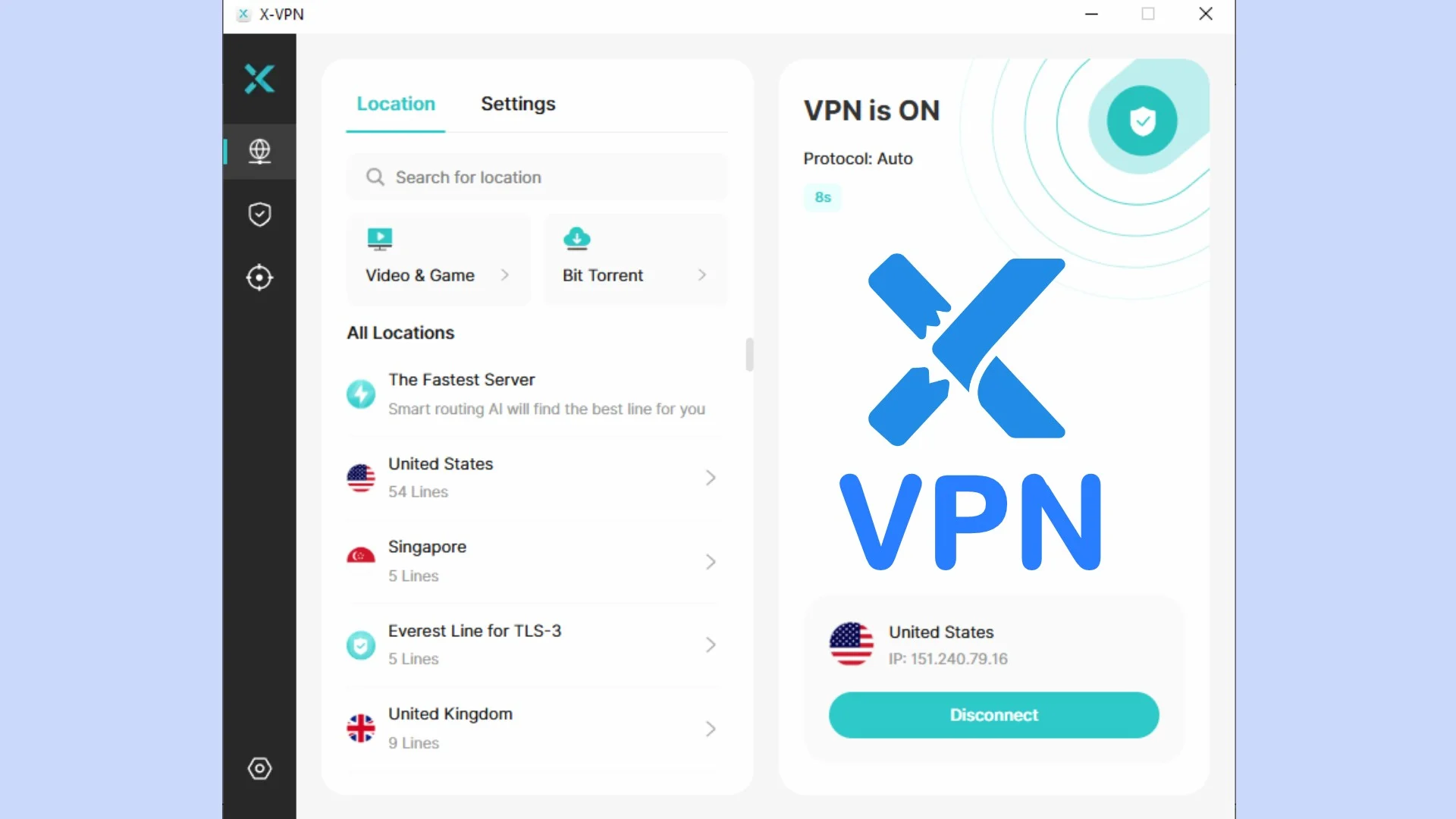
Once you have downloaded and installed the VPN for PC, you can connect to the fastest server by clicking the connect button and letting the smart routing AI do the rest.
This immediately applies military-grade encryption and prevents your ISP, Wi-Fi hackers, and other snoopers from seeing your internet traffic.
Alternatively, if you wish to choose a specific country to hide your location, X-VPN lets you freely select from states and cities across 80 countries.

This helps bypass government censorship and unblock regional content, such as gaming lobbies and streaming libraries in other countries.
X-VPN saves your recent location choices, and you can easily find others by scrolling or using the search bar.
In total, the network is supported by over 10,000 individual servers, so you’re unlikely to ever experience downtime or slow speeds.
Fine-Tuned for Gaming, Streaming, and Downloading
You will notice alongside the location choices, you can also select servers under the categories of Video & Game and BitTorrent.

For example, if you plan to watch a streaming service in the US, find the streaming list and look for US-Video, which has multiple optimized servers specifically for different streaming platforms. In total, there are over 140 optimized streaming servers for the United States, Great Britain, Canada, Australia, Mexico, Brazil, Argentina, and Japan.
Regular servers still work for watching videos, but these are more likely to unblock geo-restricted content and provide a buffer-free experience.

For online gaming, there are currently 4 lines designed for Roblox, PUBG, BGMI, and the Pokémon Trading Card Game.

Likewise, the list of BitTorrent servers ensures you can connect to torrent trackers and peers while protected by the VPN. For the best download speeds, you should choose a server closest to your real location.
Your Choice of Protocols
The first option under settings on the VPN page is Protocol. This determines how your data is transmitted, encrypted, and authenticated during a VPN connection. Each protocol has slightly different characteristics, such as favoring different devices like mobile or types of traffic, like streaming.
Most users will have the best experience using X-VPN’s default Everest setting, which is automatically configured for your network. However, you can manually choose different protocols if you know what you’re doing.

Everest is not open source, which is good for getting around VPN restrictions as it cannot be blocked based on known features. As well as excelling at obfuscation, Everest adheres to military-grade encryption and supports connections via UDP, TLS, TCP, and HTTP.
Having tested Everest, we experienced no IP or DNS leaks, backing up its security claims.
Alternatively, the more common OpenVPN and WireGuard protocols can be used instead. These are fast and secure, but more likely to be identified by sites and services trying to block VPN usage.
What is Obfuscation?
Also under the Protocol setting is an area to enter a domain name. This applies obfuscation, which is the process of making your traffic look like it’s coming from a certain source.

A basic VPN connection encrypts traffic, essentially making it invisible. However, this itself can signify that you might be using a VPN. Moreover, the way common VPN protocols package and transmit data can sometimes be identified, even if the content itself is hidden.
When using obfuscation methods, the data is packed in such a way that it looks natural. Without this, sophisticated ISPs or government censorship programs might block you for irregular traffic or because they suspect you’re using a VPN.
X-VPN builds on the obfuscation method by letting you enter a trusted domain that you are allowed to access. It then makes it appear like your traffic is being generated by visiting this domain.
For example, on a school network you might enter google.com or Wikipedia.com, as these are sites not blocked by the school and will look natural to the firewall and any network admins snooping on your activity.
Stable Connection

Stable Connection is a backup feature you can use if you’re experiencing disconnections or unreliable performance. Rather than relying on a single server, it intelligently selects a range of high-performance servers close to your real location and optimized for your network conditions.
Because of this tailored approach, it will take more time for X-VPN to connect. However, it’s a worthwhile tradeoff for a stable connection when downloading large files or watching something without buffering.
Simply toggle the setting on and it will do the rest automatically.
Automatic Kill Switch
If you don’t want to risk your real IP address and internet activity being temporarily leaked, you should toggle on the Kill Switch.

In the event of being disconnected from the VPN server, this pauses internet activity until safely reconnected.
X-VPN has several free IP lookup and leak testing tools on its website, so you can be sure the VPN is working correctly.

I connected to a server in France and ran each test. No leaks were detected.
Twice the Protection with Double VPN
Double VPN or multi-hop is the process of connecting to one VPN server and then passing that secure connection through a second server.

By passing through multiple servers, double VPN connections make it even more difficult for third parties to trace your online activities or intercept your data.
In the rare case that one server in the chain is compromised, your data will still be protected by the second one.
Choose Which Apps to Protect
Toggling on the split tunneling feature gives you full control over the apps that should or shouldn’t use the VPN.

Click the link and use the dropdown arrow to select whether you are enabling or disabling the VPN for the list of apps. Then click Add to select the app or program.
Split tunneling is useful when you are not concerned about encryption or location for some activities. E.g., when watching Netflix in your home region or when you want a game to have the lowest ping.
Furthermore, local printers or NAS devices might require your standard internet connection to talk to your PC.
Note: You may need to restart your PC after configuring split tunneling.
Browser Protection

X-Protection is found under the Security tab on the left menu, which is now only available for Windows and macOS users. By turning this on, you get additional protection while browsing the web, including:
Tracker Blocker – Stops cookies, beacons, and browser data used for tracking your web activity from within the browser.
Malicious Blocker – Prevents and alerts you when a website is blacklisted for phishing, sending malware, or otherwise malicious.
Search Protection – Highlights search results that are potentially dangerous to click on (Google and Bing only).
Download Protection – Prevents unwanted and dangerous files from downloading.
It maintains a block history and a quarantine section where you can restore any false positives. You can also whitelist URLs that should never be blocked.
Block Ads
An Ad Blocker is also found in the Security section. Turn this on and it will immediately begin blocking popups, floating ads, and banners from loading on web pages.

This is good because ads are often a risk when it comes to tracking, and they can sometimes infect your computer if not properly vetted.
You’ll also notice pages loading faster because your browser isn’t bogged down.
If you don’t mind ads on some sites, you can add the URLs into the whitelist.
Check Email Security
The third tab in the left menu is the Dark Web Monitor. This scans the dark web to check if your email address is included in any data breaches by cybercriminals. If so, you should immediately change the password and ensure extra measures like two-factor authentication are enabled.

To monitor additional email addresses, click Add and then follow the verification step emailed to the address.
Startup Programs Manager
Startup programs are the programs and services that launch automatically when Windows boots. These can be annoying and slow down the system, especially if there are too many.
X-VPN provides a user-friendly utility for disabling these in the Security section. Simply scroll down the list and use the toggle beside each program.

Unlike Windows Task Manager, it displays the full path to the program to give a better idea of what it is.
HDD Cleaner
X-VPN also offers a user-friendly interface for clearing space on your hard drive.
Click Storage Cleanup and select the type of data to remove from the system cache, recycle bin, logs, and other temporary files.

Toggling on Auto-Cleanup lets you set a day of the week to remove these unwanted files on a schedule.
Again, this isn’t anything you can’t do in Windows already, but it’s useful to have under one app.
Speed Tests
In general, I found X-VPN to be fast and reliable, capable of supporting streaming and other high-bandwidth tasks regardless of the location chosen. I did not have to use the Stable Connection feature, though it’s nice to know it’s there if needed.
Of course, all VPNs will impact speed because traffic is routed through a separate server. The further away this server, the higher the impact.
To put this into perspective, I tested my internet speed with SpeedTest.net without the VPN turned on. This returned 20.79 Mbps download and 20.15 upload.

I then turned the VPN on using the automated fastest server option. The speed was now 17.59 Mbps download and 9.91 Mbps upload.
That’s roughly a 15.4% drop in download speed, which is well within the acceptable 10-30% range for using a VPN.
Price Plans
X-VPN provides a fully free version across Windows, macOS, iOS, Android, and Chrome. There’s no account requirement — you can simply download the app and start using it immediately, with no data caps. These features make X-VPN stand out among numerous free VPN providers.
Also, the free plan’s features do vary depending on the platform. On mobile devices, free users can manually select servers across 26 regions, though ads will appear. The free VPN for PC automatically connects users to a pool of more than 1,000 servers across 50 locations
All free versions provide reliable VPN encryption and essential functionality, but to get the best experience consider one of the premium plans:
- Monthly: $11.99
- Annual: $47.99 (approx $3.99/mo)
- 24 Months: $69.99 (approx $2.99/mo)
As well as the Windows app, you also get free access to apps for macOS, Linux, Android, iOS, Chromebook, Amazon Fire TV, and more. The premium subscription lets you protect up to 5 different devices simultaneously.
All purchases are subject to a 30-day money back guarantee.
To keep your account private, X-VPN supports payment in cryptocurrency: BTC, BTC Cash, ETH.
Customer Support
X-VPN has an extensive help center on the website to help answer your queries. If you need to contact support directly, it offers both email at [email protected] and live web chat.
The latter only takes a few minutes to reach a real member of support staff rather than a bot.
Is X-VPN Safe?
Yes, X-VPN is considered a safe and reputable VPN provider. It enforces a no-log policy, which means it does not store any meaningful data about you or your VPN usage, even if such data was requested by law enforcement.
This is backed up by its 2025 transparency report that states: No identifiable user data has ever been shared in response to the 239,000 DMCA takedown requests and 65 law enforcement inquiries, made between 2017 and June 2025.
It is also worth mentioning that X-VPN uses RAM-only servers. This means data is stored exclusively in volatile memory (RAM), rather than on hard drives. When the server is rebooted, all data is wiped clean, preventing any potential data retention or unauthorized access.
As well as using its own leak testing tools, I connected to the VPN using a server in Finland and double-checked using IPLeak.net.
Once again, X-VPN is shown to be secure, with no IP, WebRTC, or DNS leaks.

To further back up its no-log policy, X-VPN is in the process of undergoing an independent audit from a third-party.
X-VPN Review – Verdict
4.5/5
Concluding this X-VPN review, there isn’t much not to like. It has a robust server network with all the locations you could desire, along with optimized servers for specific tasks.
You never have to worry about your connection security or your real IP address being exposed. Moreover, its extra safe browsing tools protect you from malicious web content too.
All the important VPN settings and features are available, and the app is intuitive and easy to configure.
The fact you can Try X-VPN for free before committing to an affordable plan, is the icing on the cake!