What Is Firmware? Simple Guide for PCs, Routers, and Phones
XINSTALL BY CLICKING THE DOWNLOAD
FILE
Firmware powers the basic functions of your hardware and keeps devices running correctly from the moment you turn them on. Phones, routers, PCs, SSDs, and smart home gadgets rely on firmware to operate safely and consistently.
What Is Firmware? All You Need to Know
What Is Firmware in Tech?
Firmware controls how hardware behaves and enables the operating system to communicate with physical components. This includes low-level systems like SSD controllers as well as startup tools such as BIOS and UEFI.
When you learn how BIOS and UEFI work together in a computer, guides like What Is UEFI and What Is BIOS? help you understand how firmware fits into the boot process.
Why Firmware Matters
Firmware updates improve security, stability, and compatibility. Manufacturers fix bugs, patch vulnerabilities, and enhance performance by releasing new versions, so every device benefits from timely updates.
Types of Firmware
Firmware comes in several forms, and each one serves a specific role.
- Low-level firmware: Controls essential hardware functions and starts the device.
- High-level firmware: Handles advanced features such as menus, device settings, or smart functions.
- BIOS or UEFI firmware: Runs during startup to initialize hardware and load the operating system.
How Firmware Works
Firmware stores in ROM, flash, or EEPROM memory. It loads instantly when the device powers on and guides hardware behavior before the operating system takes over. Every device uses this layer to manage low-level operations.
How to Check Firmware Version
Smartphones
Check the version inside your system settings.
- Open Settings.

- Tap About phone or About device.

- Open Software information or Firmware version.

Windows PCs
System Information shows BIOS or UEFI versions.
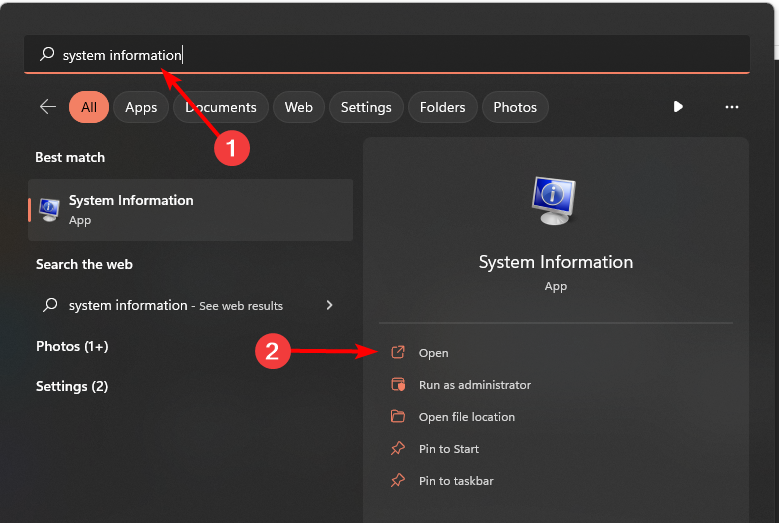
- Press the Windows key and open System Information.
- Look for the BIOS Version or UEFI Version entry.
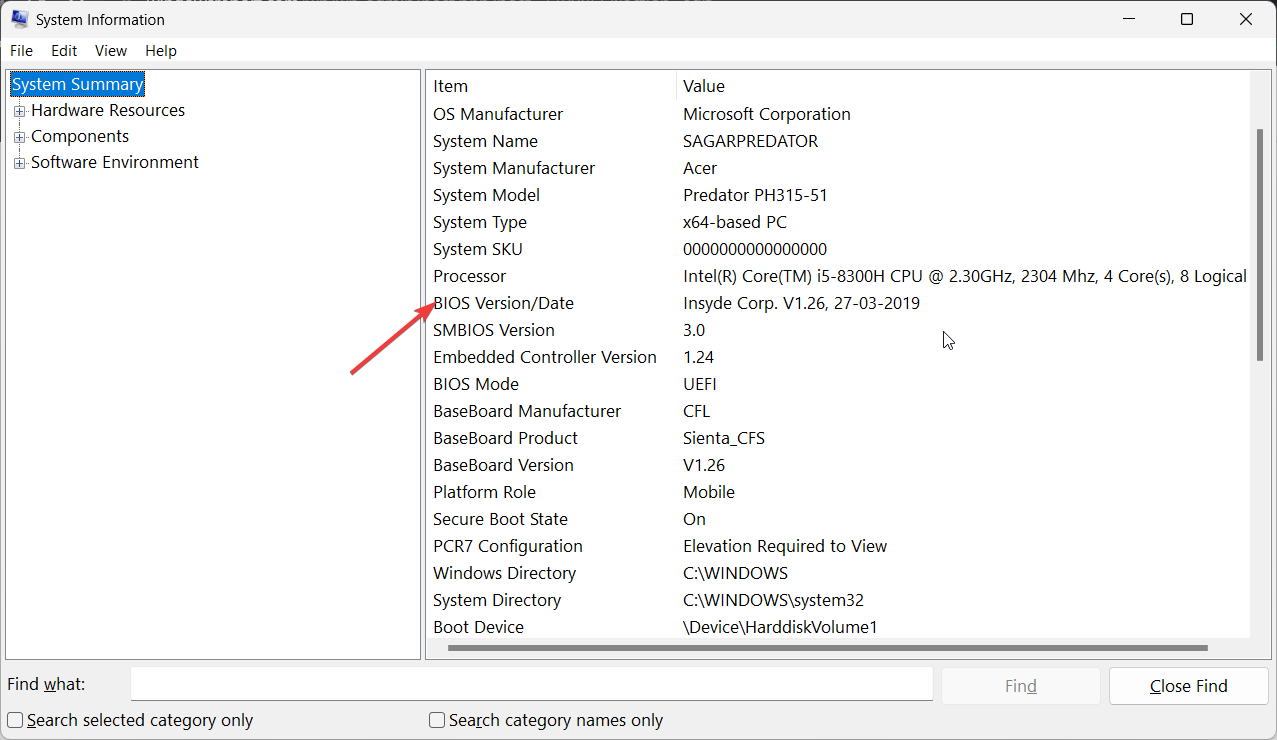
- Write down the version so you can compare it with available updates.
You can also review safe update methods in guides like How To Update BIOS in Windows 11.
Routers
Router dashboards show the current firmware version by default.
- Open a browser and enter your router’s login address.
- Sign in with admin credentials.
- Check the Status or System page to view firmware information.
If you want to update your router afterward, guides such as How To Update Router Firmware explain the process clearly.
How to Update Firmware Safely
General Steps for Any Device
Follow these steps when you install a new firmware version on most devices.
- Visit the support page for your device model.
- Download the exact firmware release for your hardware.
- Charge your device or plug it into stable power.
- Launch the update file or upload it through the device interface.
- Restart the device to complete the process.
What to Avoid
These simple rules protect your device during updates.
- Do not install firmware made for a different model.
- Do not stop the update once it starts.
- Do not run updates during power fluctuations.
Why Firmware Updates Help
Regular updates fix errors, improve system performance, and strengthen security. Updated firmware keeps hardware stable and reduces compatibility issues.
FAQs
No. Firmware manages hardware behavior while software runs on top of the system.
No. Firmware provides the essential startup instructions.
Check for updates every few months or when the device shows performance issues.
Some devices switch to a recovery mode, while others require a manual repair tool from the manufacturer.
Conclusion
Firmware controls hardware behavior, shapes the startup process, and supports communication between devices and their operating systems. When you update it regularly, you improve performance and enhance security across your entire setup. The guides mentioned in this article help you understand what firmware is, how BIOS and UEFI work, and how to manage router and PC firmware without risking your device.


Readers help support Windows Report. We may get a commission if you buy through our links.

Read our disclosure page to find out how can you help Windows Report sustain the editorial team. Read more