Windows 11 Gets Cross-Device Resume With KB5064093 Update In Dev & Beta Channels
Readers help support Windows Report. We may get a commission if you buy through our links.

Read our disclosure page to find out how can you help Windows Report sustain the editorial team. Read more
Microsoft has rolled out Windows 11 Insider Preview builds 26200.5761 (Dev) and 26120.5761 (Beta) under KB5064093, introducing the ability to seamlessly resume Android apps like Spotify on your PC.
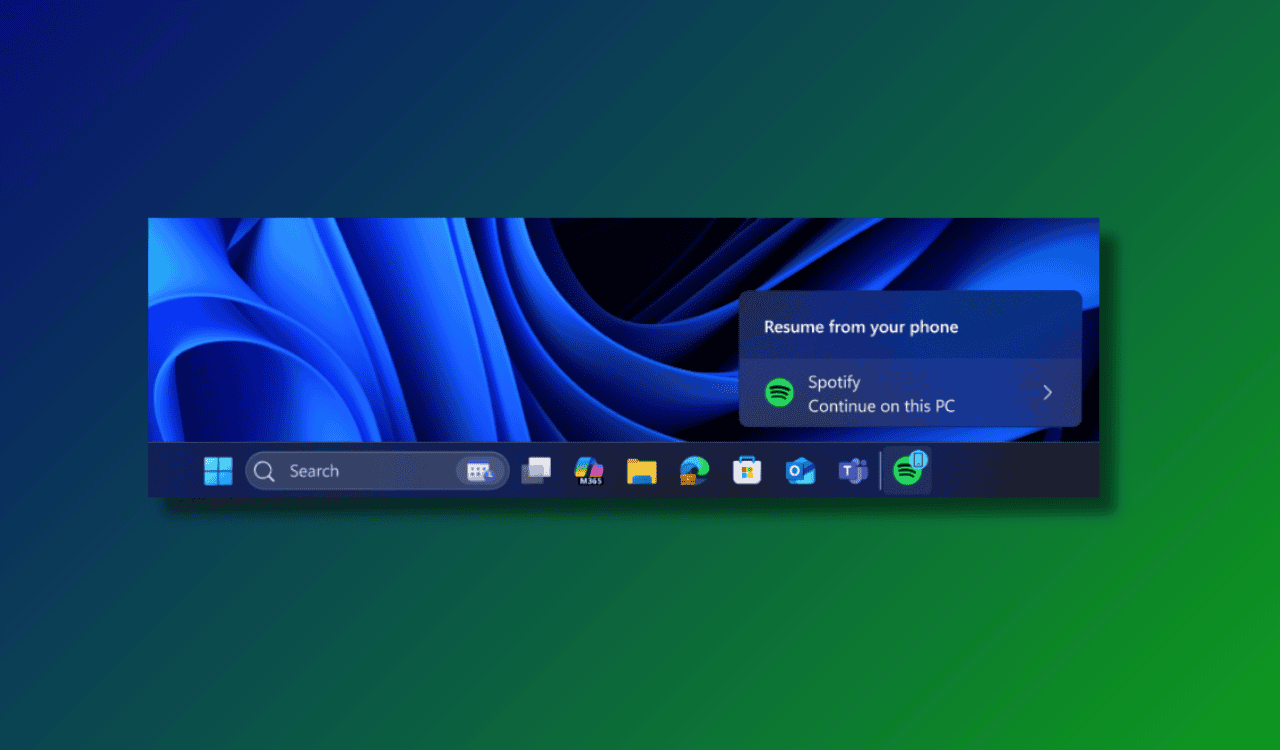
With this update, when you’re playing music or a podcast on Spotify via your Android phone, your PC will now display a “Resume alert” on the taskbar. Clicking it launches the Spotify desktop app and continues playback right where you left off.


If Spotify isn’t installed on your PC, Windows handles it automatically with a one-click install from the Microsoft Store, prompting you to sign in. This is part of Microsoft’s broader vision of tighter phone-to-PC integration.
To enable:
- Go to Settings > Bluetooth & devices > Mobile devices and allow access.
- On your phone, set up the Link to Windows app with background permissions enabled.
- Start Spotify on your phone, and the resume alert should appear on your PC.
The feature is gradually rolling out. If you’re not seeing it, don’t worry, you’ll eventually come across it. All in all, this is one of the biggest upgrades to cross-device continuity in Windows 11 yet. If you are a melophile, you must check these best equalizer settings for Spotify. Not to forget, the same update in the Beta channel also adds a new battery icon to the lock screen of Windows 11 and Window Mode screen recording in the Snipping Tool.