Windows 11 Narrator Now Gives You More Control Over Spoken UI Details
The latest Windows 11 Insider update, KB5072043, is now available, bumping systems to Build 26220.7523 for testers in the Dev and Beta channels. Alongside the usual under-the-hood tweaks, Microsoft is rolling out a notable accessibility improvement focused on Narrator.
With this update, Windows 11 now lets users personalize what Narrator announces when navigating apps. Until now, Narrator followed a fixed pattern when reading UI elements like buttons, checkboxes, sliders, or text fields. That worked, but it didn’t always match how people actually process information.
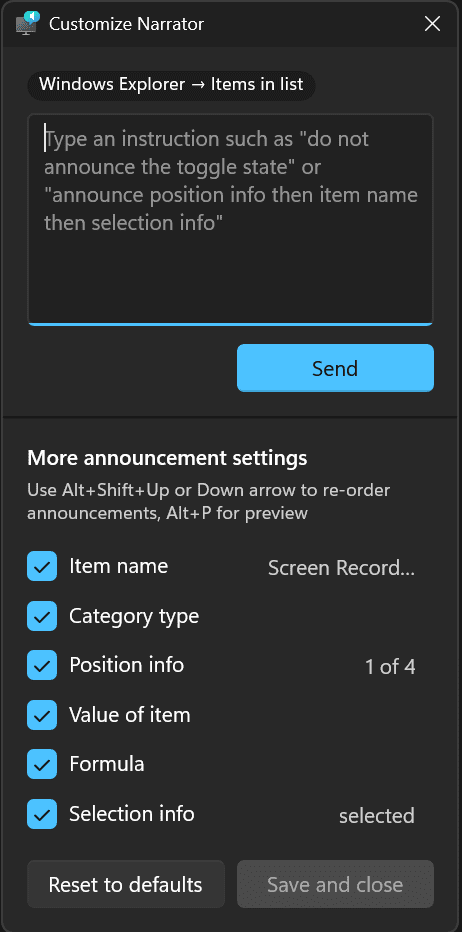
The new option changes that. Users can decide which properties Narrator speaks, and just as importantly, the order in which they’re spoken. For example, when landing on a “Submit” button, you can choose whether Narrator announces the label first, the control type first, or skips one entirely. The same applies to checkboxes, where the “checked” state can be moved, delayed, or removed from the announcement.
You can access customization using Narrator key + Ctrl + P, where properties can be selected, unselected, and reordered per control type. On Copilot+ PCs, Microsoft is also testing a faster method using a natural language input box. You can simply type instructions like, “Don’t announce selection info,” and Narrator adjusts accordingly.
Changes apply across the current app, and there’s a built-in preview option so users can hear the result before saving. If needed, everything can be restored with a single Reset to default.


Readers help support Windows Report. We may get a commission if you buy through our links.

Read our disclosure page to find out how can you help Windows Report sustain the editorial team. Read more