KB5070316 Adds Native MCP, Smarter App Updates, and MIDI 2.0 Tools to Windows 11 25H2
Microsoft has just released Windows 11 Insider Preview Build 26220.7344 (KB5070316) in the Dev and Channel channels of version 25H2, and it comes with a bunch of new features. Here’s the changelog for it:
New features are gradually being rolled out with toggle on*
Public preview of native support for MCP on Windows
Windows now offers native support for the Model Context Protocol (MCP), an open standard that gives AI agents a universal way to connect with apps, tools, and services. Agents can discover and connect to these tools and other agents via a secure, manageable Windows on-device registry (ODR). By default, all agent connectors in the Windows on-device registry will be contained in a secure environment with their own identity and audit trail. With OS level integration, MCP on Windows delivers secure discoverability, consistent controls, and enterprise-grade manageability—empowering developers, IT professionals, and end users to build and deploy agentic workflows at scale.
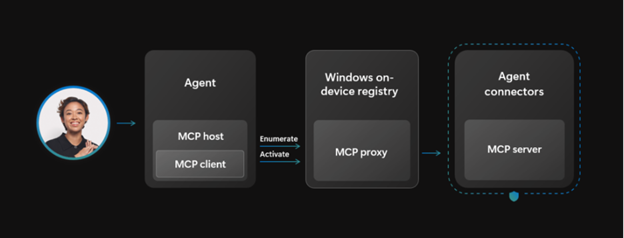
As part of this release, two agent connectors are built into Windows—File Explorer and Windows Settings.
- File Explorer Connector: Agents can use the File Explorer connector to manage, organize and retrieve local files on a user’s device with their consent. On Copilot+ PCs, the connector can also perform natural language search to retrieve the exact file based on descriptions, content, metadata, and, for images, enhanced search based on image classification.
- Windows Settings Connector: On Copilot+ PC devices, the Windows Settings connector lets users check, change settings, or navigate directly to specific pages such as display, mouse, keyboard, and sound, using natural language.
Next up, Microsoft has also mentioned that “Quick machine recovery (QMR) will now be turned on automatically for Windows Professional devices that are not domain joined. These devices will get the same recovery features as Windows Home users. For enterprise computers that are domain joined, nothing changes—QMR will stay off unless your organization turns it on.”
The changelog follows:
Update Orchestration Platform (UOP)
The Unified Update Orchestration Platform (UOP) is starting to roll out to Windows Insiders in the Dev and Beta Channels. UOP makes app updates more consistent and predictable, with fewer interruptions. Insiders will see a new page in Settings > Apps > App Updates, where they can check update progress and take action if needed.
How it Works
- Apps will register with UOP via APIs.
- UOP triggers a registered app to scan, download, and install updates based on user activity and system state.
- Apps continue to utilize their own backend for acquiring updates.
- Apps report update status back to UOP, so users can see it in the App Updates page.
Availability
No apps utilize UOP yet because the feature is new, but apps will start using it over time. The feature is partially enabled for Dev and Beta Channel Insiders today and will reach full enablement in these channels soon. API documentation will follow.
Windows MIDI Services
We’re excited to announce the highly anticipated production release of Windows MIDI Services, going to the Dev and Beta Windows Insider channels today, and then to retail Windows in the next few months. This is our update of MIDI on Windows with a focus on a great experience for musicians using MIDI 1.0 or MIDI 2.0.
New features in this release include:
- Full support for WinMM MIDI 1.0 and WinRT MIDI 1.0, complete with in-service translation, enabling any API to use any MIDI 1.0 or MIDI 2.0 device. This means your existing applications will use the new service and gain important new features like the ability for more than one app to open a MIDI port at the same time, custom port names, and more.
- New loopback and app-to-app MIDI support.
- Lots of performance improvements and bug fixes thanks to our vibrant community. Thank you!
The App SDK and Tools package is a separate download, versioned outside of Windows. This enables applications to use the in-box MIDI 2.0 features and also provides the tools you need to manage your MIDI setup on Windows, including the MIDI Console and MIDI Settings app. Current releases are available on our GitHub repo releases page or via the main Windows MIDI Services landing page. Please note that these are unsigned releases at the moment and so will give you a warning when you download and install.
We look forward to having Windows Insiders who create music try out the Windows MIDI Services release, especially with your current applications and devices. You can also join the discussion on Discord if you have questions or are looking to help or provide feedback! You will find a list of known issues documented here.
Changes and Improvements gradually being rolled out with toggle on*
[“Open With” App Integration]
We’re updating Open With so that if you don’t have a relevant app you need installed, instead of having to open Microsoft Store to find it, it will now show directly in this list as available to install. This makes it faster and easier to find and install the app you need.

For more information about this build, head to this official blog post linked at the top.


Readers help support Windows Report. We may get a commission if you buy through our links.

Read our disclosure page to find out how can you help Windows Report sustain the editorial team. Read more