Microsoft Edge Tests Copilot Discover Feed Settings
Readers help support Windows Report. We may get a commission if you buy through our links.

Read our disclosure page to find out how can you help Windows Report sustain the editorial team. Read more
After introducing Copilot Discover, Microsoft Edge is now testing a simple but important control for the Copilot feed on the New Tab Page in Edge Canary. Users can manage the Copilot Discover feed with dedicated settings built directly into the NTP.
Once Copilot Mode became available, we reported that Microsoft was adding an AI-powered feed to the Edge New Tab Page, similar to Google Discover, and labeling the experimental feature ‘Copilot Discover.’ At that time, no settings were available to control what appeared in the feed.
Microsoft Edge Tests Copilot Discover Feed Settings
To address this, Microsoft is now adding Copilot Discover Feed Settings, available behind a flag.

When enabled, you can click the cog wheel on the New Tab Page to manage what shows up in your feed. The “feed settings” allow you to:
- Set your preferred region and language.
- Pick channels for a more personalized stream.
- Block or allow specific channels.
- Choose which cards appear at the top of the feed.

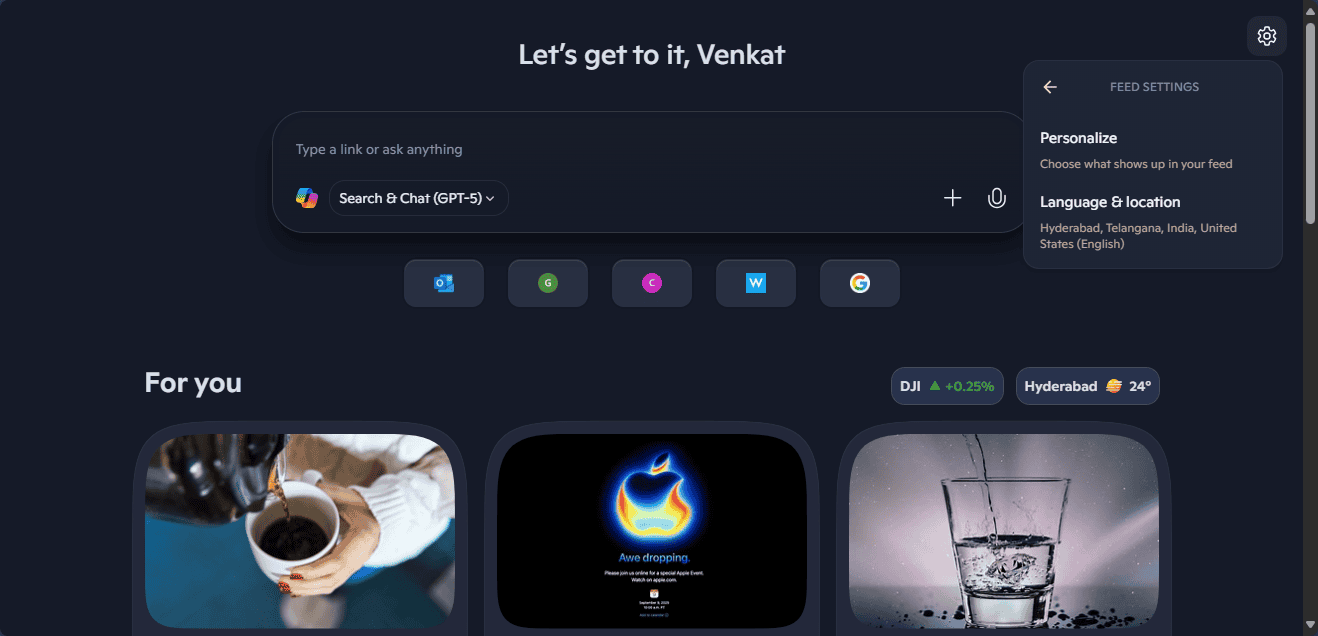
All of these options are integrated into the cog wheel’s feed settings, where Copilot Mode replaces the New Tab Page.
How to disable the Copilot Discover Feed in Edge
As always, if you don’t like the Copilot feed on the New Tab Page, you can turn off Copilot Mode entirely or disable just the Copilot Discover feed.
To turn off Copilot Mode: go to Settings > AI Innovations and toggle off Copilot Mode.
To turn off the Copilot Discover feed: go to Settings > Start, Home, and New Tab Page > New Tab Page, then toggle off Copilot New Tab Page. This switches you back to the classic MSN feed that Edge has shown for years.
Microsoft isn’t stopping with Copilot Mode. It is also testing a Copilot theme for Edge, a multi-tab summarization feature, and new scareware blocker controls.